VPC internal LB, IP pagination/management and assign vm form
Signed-off-by: Rohit Yadav <rohit.yadav@shapeblue.com>
Co-authored-by: Rohit Yadav <rohit@apache.org>
This adds the add cluster form with domain/account dedication option.
Signed-off-by: Rohit Yadav <rohit.yadav@shapeblue.com>
Co-authored-by: Rohit Yadav <rohit@apache.org>
This implements the add pod form with dedicate to domain/account option.
Signed-off-by: Rohit Yadav <rohit.yadav@shapeblue.com>
Co-authored-by: Rohit Yadav <rohit@apache.org>
The route config creates two groups of section components one for each
related paths that are cache and reused. Once these two groups of
components are mounted, on route change fetchData() is called twice
by two of such cached components beloning to two groups of paths.
This commit fixes this issue by using logical XOR to identify the
current component against related `to` route and the path the component
was in and only calls fetchData if `to` route and currentPath are of
the same group of routes.
Signed-off-by: Rohit Yadav <rohit.yadav@shapeblue.com>
Physical network and systemvms tabs for zone.
IP ranges tabs for traffic type management.
Signed-off-by: Rohit Yadav <rohit.yadav@shapeblue.com>
Co-authored-by: Rohit Yadav <rohit@apache.org>
This implements custom upload action form for template, iso, volume with progress bar.
Signed-off-by: Rohit Yadav <rohit.yadav@shapeblue.com>
Co-authored-by: Rohit Yadav <rohit@apache.org>
Adds VPC consolidated component that has tabs for may related items.
Co-authored-by: Rohit Yadav <rohit@apache.org>
Signed-off-by: Rohit Yadav <rohit.yadav@shapeblue.com>
This implements a work-in-progress VM deployment wizard.
Co-authored-by: Rohit Yadav <rohit@apache.org>
Signed-off-by: Rohit Yadav <rohit.yadav@shapeblue.com>
Adds dedicated section for zone/pod/cluster/host to dedicate that resource to a domain (and account). Implements the list, dedicate and release APIs.
Signed-off-by: Rohit Yadav <rohit.yadav@shapeblue.com>
Co-authored-by: Rohit Yadav <rohit@apache.org>
This implements the take volume snapshot action form with support for tags.
Signed-off-by: Rohit Yadav <rohit.yadav@shapeblue.com>
Co-authored-by: hoangnm <hoangcit92@gmail.com>
Co-authored-by: Rohit Yadav <rohit@apache.org>
This adds action form to change template permission.
Signed-off-by: Rohit Yadav <rohit.yadav@shapeblue.com>
Co-authored-by: Rohit Yadav <rohit@apache.org>
Existing code was not listing *offerings recursively due to which domain admin user was not being able to see all offerings in its domain. This PR fixes listing behaviour.
Signed-off-by: Abhishek Kumar <abhishek.mrt22@gmail.com>
Signed-off-by: Rohit Yadav <rohit.yadav@shapeblue.com>
This fixes#41
Adds project specific dashboard tabs, custom actions and tabs for project view. Also adds quickview and other list/details view improvements.
Co-authored-by: hoangnm <hoangcit92@gmail.com>
Co-authored-by: Rohit Yadav <rohit@apache.org>
Signed-off-by: Rohit Yadav <rohit.yadav@shapeblue.com>
This fixes#35
This fixes#51
This closes#78
This adds the following:
- Download iso, template, volume handler to show link
- Show VM password on VM start and upon reset password action
Signed-off-by: Rohit Yadav <rohit.yadav@shapeblue.com>
This implements actions args remapping framework which allows developers
to specify how to provide/show args to the user/admin or how to override
based on the resource by means of (a) `value(record)` function, (b)
statically defined `api` name, (c) `options` array.

For example, in the config file:

```
  args: ['id', 'virtualmachineid', 'mode'],
  mapping: {
    id: {
      api: 'listIsos'
    },
    virtualmachineid: {
      value: (record, params) => { return record.id }
    },
    mode: {
      options: ['http', 'nfs', 'something else']
    }
  }
```

Signed-off-by: Rohit Yadav <rohit.yadav@shapeblue.com>
- Reusable details settings component for VM and templates, with autocompletion of options
- Instancegroup feature
- split monitor into individual event and alert tabs, move alerts to infra
- reimplement logo
- project selection refactorings
- use password input for relevant fields

Signed-off-by: Rohit Yadav <rohit.yadav@shapeblue.com>
This implements polling in the detail view and refreshes detail view
on async job/action completion (in both success and failure cases.

Signed-off-by: Rohit Yadav <rohit.yadav@shapeblue.com>
Fixes: #17Fixes: #18
These dependencies are necessary or eslint will fail with the standard vue.js rule set.
The PR also includes fixes for all lint errors.
Signed-off-by: Rohit Yadav <rohit.yadav@shapeblue.com>
This adds:
- a Dockerfile
- a build script that injects some labels from git
- an example nginx config for running the built webpack
- instructions on how to run the container

Signed-off-by: Rohit Yadav <rohit.yadav@shapeblue.com>
Fixes: #12

With build tooling added to the dev dependencies, it is no longer necessary to install system-wide.
This is particularly useful for production builds, where system-wide package pollution is highly discouraged or even prohibited.

npm@next, vue-cli and ncu may still be useful to developers, but they shouldn't be part of the build instructions. A separate readme update is on the way.

The PR now also includes a readme update to clarify which tools should be installed when.
Production builds do not need global tool installs.

Signed-off-by: Rohit Yadav <rohit.yadav@shapeblue.com>
I fixed the margin between the detail items of the info card component. I removed the imho misused css class.

Signed-off-by: Rohit Yadav <rohit.yadav@shapeblue.com>
Add actions from old UI to new UI

Fixes: #40

Doing the following:

Extract out actions from old UI to new for infra section - zones, pods, clusters, ...etc.
Support translation of labels for actions instead of hard coding them
Translation of action buttons in list view, detail view, forms and also their fields will now be human readable.
Some misc changes - like comparing API param names with case insensitive stuff, allowing reusing of same API for multiple actions by passing defaultArgs: to action in config files.

Signed-off-by: Rohit Yadav <rohit.yadav@shapeblue.com>
When custom component is specified for an action, allow boolean option
to display that component either in a popup or in routable component.

Signed-off-by: Rohit Yadav <rohit.yadav@shapeblue.com>
Add Translations from old files and scripts to generate it.
Update columns generated to be formatted.

Show modal instead of drawer for forms

Signed-off-by: Rohit Yadav <rohit.yadav@shapeblue.com>
* Add new grid values new classes to replace inline stlyes with it

* Fix navigation scroll behavior

Signed-off-by: Rohit Yadav <rohit.yadav@shapeblue.com>
This is a difficult first step to more unified less code.

replace inline styles with class names and define rules at the end of vue files
remove first ant-pro classes (no benefits with it yet)
move some less rules to components

Signed-off-by: Rohit Yadav <rohit.yadav@shapeblue.com>
Add necessary args to listProjects request for project selection

Currently the project selector does not work, because some arguments where missing in the request. I added these arguments and also added the userid as the CURRENT_USER to the application store.

Signed-off-by: Rohit Yadav <rohit.yadav@shapeblue.com>
Delete global.less file and split rules into several .less files inside new style folder.
Upgrade import paths and write readme file that describes how less-coding could look like.
Add missed npm package to fix terminal error.

Signed-off-by: Rohit Yadav <rohit.yadav@shapeblue.com>
As notified in the 4.14.0.0 release notes, this deprecates the legacy UI
and moves it under the ui/legacy directory which will be served at
/client/legacy URL path. This will also ensure that users upgrading or
installing 4.15.0.0 will get the new UI by default. This will also make
it simpler to remove the old UI for future 4.16/master releases.

Co-authored-by: Daan Hoogland <daan.hoogland@shapeblue.com>
this contains other changes
(1) add isrouting field for vm templates on UI
(2) show register URL of template/iso on UI
(3) set 'Bootable' field to changable for existing ISO
This handle edge cases of upgrades and when legacy UI is used along with
Primate or any UI sharing cookies. The specific case it fixes involves
removal of duplicate sessionkey cookies.

Signed-off-by: Rohit Yadav <rohit.yadav@shapeblue.com>
For customer constrained offering, the cpu speed is fixed.
Therefore the 'CpuSpeed' field should be hidden for customer constrained offering when change vm offering on UI.
It is visible only for unconstrained offering.

This is regression issue of #3245
When the static route service is not available on the VPC and a static route is created, the static route is created in a revoked state.
Currently, the UI doesn't distinguish between active or revoked static routes.
This PR adds the missing state filter to the list routes command and only lists active routes in the UI.
It also ignores revoked routes when the private gateway is being removed but clears out the inactive routes before the gateway is removed.
Fixes#2908
This PR adds implementation for changing host and storage name, additionally, it fixes a Bug on cluster updateCluster API command. This PRs also enhances the UI by allowing editing field name on Host and Storage pool. Due to the fact that there is no support to editing cluster via UI, it was not edited.

TODO: I will address Host, Cluster, and Storage Pool name edition on CloudStack Primate once the API implementation gets merged.

Details:
Prior to this PR the following API commands did not offer support for updating name:

updateHost (enhancement)
updateStoragePool (enhancement)
Additionally, updateCluster claims to support changing a cluster name (via clustername parameter); however, such operation did not work. (bug)
This PR adds support for the OOBM Redfish protocol, implementing a Java client to send HTTP requests to Redfish supported systems.

Implementation overview:
- Redfish Java client: a Java Client for Redfish that makes Redfish actions available to the HA workflow via an OOB driver.
- OOB Redfish driver: a new Out-of-band driver was created for Redfish, allowing to integrate the Redfish Client with the CloudStack Out-of-band management implementation.

Fixes: #3624
Advanced Network with Security Groups is a great option for deploying a Zone with IPv6 address support. However, it is not possible to set IPv6 DNS + IPv6 CIDR + IPv6 gateway via the zoneWizard UI.

Currently, the workaround is to either (i) create a new network (the default guest network would not support IPv6), (ii) deploy a zone via API, or (iii) to run a MySQL update query to set the default guest network IPv6 config.

This PR adds a small enhancement on the UI Zone deployment to allow deploying a Zone with Advanced Network with Security Groups + IPv6 CIDR, IPv6 gateway, and IPv6 DNS.

Note that API [1] offers full support for such action, therefore there is no need for changing the API. It is just a small enhancement on UI that might be useful in the meantime that we wait for the new ACS UI.

[1] https://cloudstack.apache.org/api/apidocs-4.13/apis/createNetwork.html
By default, once we create a security group we cant change its name.
In this feature, we introduce a new API command "updateSecurityGroup"
which allows us to rename the security group name. Although we can't
change the name of the "default" security group.
* Enable PVLAN support on L2 networks

* Fix prevent null pointer on details

* Add marvin tests

* Fixes from comments

* Fix: missing pvlan type on plugniccommand

* Fix checks on network creation for vlans overlap

* Fix remove prefix from secondary vlan id

* Improve checks on physical network for pvlans

* Fix compatibility with previous pvlan creation

* Fix shared networks backwards pvlan compatibility

* Add ui fix for pvlan type not passed to api

* Add check for isolated vlan id overlap

* Include check for dynamic vlan reserved for secondary vlan

* Fix marvin tests errors

* Fix redundant imports

* Skip marvin test for pvlan if dvswitch is not present

* spelling

Co-authored-by: Andrija Panic <45762285+andrijapanicsb@users.noreply.github.com>
This makes the listSystemVms API to return the host status (agent state),
version and last pinged information. This makes it possible for UIs
to call a single API to get this information.
* server: fix resource count of primary storage if some volumes are Expunged but not removed

Steps to reproduce the issue
(1) create a vm and stop it. check resource count of primary storage
(2) download volume. resource count of primary storage is not changed.
(3) expunge the vm, the volume will be Expunged state as there is a volume snapshot on secondary storage. The resource count of primary storage decreased.
(4) update resource count of the account (or domain), the resource count of primary storage is reset to the value in step (2).

* New feature: Add support to destroy/recover volumes

* Add integration test for volume destroy/recover

* marvin: check resource count of more types

* messages translate to JP

* Update messages for CN

* translate message for NL

* fix two issues per Daan's comments

Co-authored-by: Andrija Panic <45762285+andrijapanicsb@users.noreply.github.com>
* pass domainid for list users

* passing arg in wizzard

* adding userfilter to list ldap users and usersource to response

  port of list ldap users tests to java

* assertion of differnt junit ldap methods

* broken test for directory server (and others)

* embedded context loading

* add user and query test

* UI: filter options passing filter and domain and onchange trigger

* disable tests that only work in ide

prereqs for domain-linkage fixed

move trigger to the right location in code

trigger for changing domain

* logging, comments and refactor

implement search users per domain

retrieve appropriate list of users to filter

get domain specific ldap provider

* query cloudstack users with now db filter

* recreate ldap linked account should succeed

* disable auto import users that don't exist

* ui choice and text

* import filter and potential remove from list bug fixed

* fix rights for domain admins

* list only member of linked groups not of principle group

* Do not show ldap user filter if not importing from ldap
  do not delete un-needed items from dialog permanently
  delete from temp object not from global one

* localdomain should not filterout users not imported from ldap

* several types of authentication handling errors fixed and unit tested

* conflict in output name

* add conflict source field to generic import dialog

* replace reflextion by enum member call

* conflict is now called conflict 🎉
* * Complete API implementation
* Complete UI integration
* Complete marvin test
* Complete Secondary storage GC background task

* improve UI labels

* slight reword and add another missing description

* improve download message clarity

* Address comments

* multiple fixes and cleanups

Signed-off-by: Rohit Yadav <rohit.yadav@shapeblue.com>

* fix more bugs, let it return ip rule list in another log file

Signed-off-by: Rohit Yadav <rohit.yadav@shapeblue.com>

* fix missing iprule bug

Signed-off-by: Rohit Yadav <rohit.yadav@shapeblue.com>

* add support for ARCHIVE type of object to be linked/setup on secstorage

Signed-off-by: Rohit Yadav <rohit.yadav@shapeblue.com>

* Fix retrieving files for Xenserver

* Update get_diagnostics_files.py

* Fix bug where executable scripts weren't handled

* Fixed error on script cmd generation

* Do not filter name for log files as it would override similar prefix script names

* Addressed code review comments

* log error instead of printstacktrace

* Treat script as executable and shell script

* Check missing script name case and write to output instead of catching exception

* Use shell = true instead of shlex to support any executable

* fix xenserver bug

* don't set dir permission for vmware

* Code review comments - refactoring

* Add check for possible NPE

* Remove unused imoprt after rebase

* Add better description for configs

Co-authored-by: Nicolas Vazquez <nicovazquez90@gmail.com>
Co-authored-by: Rohit Yadav <rohit@apache.org>
Co-authored-by: Anurag Awasthi <anurag.awasthi@shapeblue.com>
Currently while creating ingress/egress rule for a security group,
we can specify only TCP/UDP/ICMP. Sometimes we need to add rules
for different protocol number or rules for all the above three
mentioned protocols.

In this new feature users can specify the protocol number or select
"ALL" option which will apply rules for TCP/UDP/ICMP
Currently in cloudstack, when we click on "Acquire New Ip", it will
randomly acquire IP from the pool. With this enhancement, it is
possible to select the IP from the drop down IP list of that network.
Same thing applies for a VPC as well.
* create template from snapshot regression (partly reverted) (#3767)

* Once again allow a VM to be on multiple networks from VPCs (#3754)

to once again allow a VM to be on multiple networks from VPCs

* convert protocal names to be found as labels (#3747)

* convert protocal names to be found as labels

* format

* filter hosts to query on zone wide storage (#3733)

* config: add isdynamic flag in configuration response (#3729)

Co-authored-by: Wei Zhou <ustcweizhou@gmail.com>
* Service layer changes for new way of tracking maintanence progress

* Fixes after offline code review

* Fix marvin tests

* Change state name and add documentation

* Fix test

* Fix and add more unit tests for different caseS

* Fix and enhance Marvin Tests

* Fixes for corner cases

* More fixes and logging

* UI fixes

* Some minor changes and reducing VMs on host for more contained tests

* Fixed ssh client auth problem causing test failure

* Code review changes + fixes + some more logging

* Fix flaky tests by adding delays between host states

* Added fetching only enabled hosts for tests

* Make port blocking KVM specific and refactor to handle failure

* Make failing migrations due to tagged host instead of port blocking

* Added additional check for migrating VMs

* Refactor to use single place for methods checking maintenance states
Problem: In Vmware, appliances that have options that are required to be answered before deployments are configurable through vSphere vCenter user interface but it is not possible from the CloudStack user interface.

Root cause: CloudStack does not handle vApp configuration options during deployments if the appliance contains configurable options. These configurations are mandatory for VM deployment from the appliance on Vmware vSphere vCenter. As shown in the image below, Vmware detects there are mandatory configurations that the administrator must set before deploy the VM from the appliance (in red on the image below):

Solution:
On template registration, after it is downloaded to secondary storage, the OVF file is examined and OVF properties are extracted from the file when available.
OVF properties extracted from templates after being downloaded to secondary storage are stored on the new table 'template_ovf_properties'.
A new optional section is added to the VM deployment wizard in the UI:
If the selected template does not contain OVF properties, then the optional section is not displayed on the wizard.
If the selected template contains OVF properties, then the optional new section is displayed. Each OVF property is displayed and the user must complete every property before proceeding to the next section.
If any configuration property is empty, then a dialog is displayed indicating that there are empty properties which must be set before proceeding
image
The specific OVF properties set on deployment are stored on the 'user_vm_details' table with the prefix: 'ovfproperties-'.
The VM is configured with the vApp configuration section containing the values that the user provided on the wizard.
This PR fixes range check in VM deployment wizard while using custom constrained offering.
Existing code was failing while checking user input value in the form for CPU cores and RAM size when minimum and maximum value vary in digit count.
Also, while re-selecting offerings slider position was not restored to minimum value. THis has been fixed with changes.

Signed-off-by: Abhishek Kumar <abhishek.mrt22@gmail.com>
1. Fix populating g_allowUserViewAllDomainAccounts flag. This was
implemented incorrectly and caused flag's effect to not reflect
directly after login.
2. Filter account/project names only for add operation. update
template permissions API is implemented in such a way that it allows
removal of any account that could have had permissions but allows
only adding accounts/projects which are in caller's domain.
3. Added some checks where null variable could result in crash.
It was not possible to display the entire name of items in dropdown menus within dialogs in CloudStack, such as:

Create compute offering
Create network offering
Create VPC offering
* Allow users to share templates with Accounts or Projects through the
updateTemplate permissions API

* Change behaviour to show only supported projects and accounts with update template permissions

* Allow admins to see accounts dropdown and only hide lists for users

* Don't allow sharing project owned templates as you cannot retrieve them in list api calls
Fix small UI issue when dedicating public IR range for system VMs:
Unable to execute API command createvlaniprange due to invalid value. Invalid parameter domainid value=undefined due to incorrect long value format, or entity does not exist or due to incorrect parameter annotation for the field in api cmd class.

Fixes: #3485
Currently an admin can choose which host a VM is to be started on.
They should be able to 'override' the allocation algorthm to a greater
or lesser extent at will, and be able to choose the pod, cluster or host
that they wish a new VM to be deployed in.

DeployVirtualMachine API has been extended with additional, optional
parameters podid and clusterid that will be passed to and used in the
deployment planner, when selecting a viable host. If the user supplies
a pod, a suitable host in the given pod will be selected. If the user
supplies a cluster, a suitable host in the given cluster will be selected.

Based on the parameter supplied and on passing validation, the VM will
then be deployed on the selected host, cluster or pod.
Removed the download icon when a template is not extractable.
Modified the api to allow a user from the same account as the template, to change the extractable attribute on the template.
Fixes#3400
If there are many projects and accounts, listing projects/accounts will take long time getting the resource limitation and resource count in the process. However resource count/limitation are not needed sometimes.

Add an option 'details' to listProjects and listAccounts. If you do not need the resource count/limitation, please add details=min to api call. The api execution time will be reduced significantly.
Adds functionality to sort the data that is available on each in the deploy VM wizard's step by their suitable fields:

affinityGroups by name
sshkeyPairs by name
vpcs by name

Fixes: #3050
Current master has sorting broken and the order reverses as opposed to
what is set if sortkey.algorithm is set to true. The problem lies in the
way the update APIs were being called by the UI. The code was agnostic
to a global config that backend uses to set the order of the entities
in the corresponding list APIs.

We need to make UI aware of the global config and instead of changing
sign of sort key pass proper numbers so that DB isn't confusing when
some tables have positive sortkey and some have negative.

The fix is in 2 steps-
1) Make use of sortkey name in place where it's relevant. Mere row index
is not sufficient.
2) Reverse the sortkey if we are sorting by descending (when global
config is false)
When users try to list instances in project mode from Account > SSHKeyPairs > Key > View Instances, we don't need to include sshkeypairs account name into the API Param. It's redundant and causes error.
Fixes#2895
Some APIs consume 'tags' param as string and some consume as maps.
Since each API can have at most one 'tags' param the extraction of
map based tags should only happen when strings based tags are not
extracted from the form serialization.
This readds the custom.css file to overwrite the default cloudstack styles.
Currently this is only possible by adding them to the custom.scss in the repository and compile them into the cloudstack3.css.
Now there is an empty custom.css created when compiling the scss source. This custom.css can be overwritten with the custom styles afterwards.

This functionality was broken by #3328.
Behaviour followed while updating disk, compute offerings by domain-admins,
- Domain-admins cannot change zones for offerings specified for domains/subdomains.
- Domain-admins can chnage domains(within their subdomains) for the offerings specified for their domains/subdomains.
- Domain-admins cannot change name, display text, sort-key for offerings specified for their domains/subdomains and also other domains which are not child domain for admin.

Fixes UI unidentified button bug for Update offering access form

Signed-off-by: Abhishek Kumar <abhishek.kumar@shapeblue.com>
Problem: Currently tags cannot be applied to snapshot when it is being created but through separate “create tags” API calls. For snapshot policies tags cannot be set either at creation or through “create tags” API.

Root Cause: The “create snapshots” API does not support adding tags during creation and it can only be done through “create tags” API. Snapshot policy as a resource does not support tags and no tags can be set for them through any API.

Solution: Tag support for snapshot policy has been added. Snapshot policy with tags when executed will produce snapshots containing the same tags from snapshot policy.

Following APIs have been updated:

Both “create snapshotpolicy” and “create snapshot” now accepts “tags” as a new parameter. The expected format for “tags” parameter is similar to parameter “tags” in “create tags“ API.
Deletion support for tags associated with snapshots policy has been added to “delete snapshotpolicies” API.
Tags set for snapshot policies are added to the Response of “list snapshotpolicies“ API.
UI support for setting tags to snapshots and snapshot policy is provided through the corresponding menus with a new section in each form to set tags.

Signed-off-by: Abhishek Kumar <abhishek.mrt22@gmail.com>
Problem: The VM metrics has aggregated volume bytes read/write and iops metrics but not on per volume basis.
Root Cause: The volume stats sub-system is not used to export the metrics, the support is not available for VMware.
Solution: Use the volume stats sub-system and DB table to export the metrics via the listVolumes and listVolumeMetrics API, and implement support for VMware and fix issue with network and disk metrics in the VM metrics view.

Signed-off-by: Rohit Yadav <rohit.yadav@shapeblue.com>
Problem: Users don't know what keys/values to enter for template and VM details.
Root Cause: The feature does not exist that can list possible details and options.
Solution: Based on the possible VM and template details handled by the
codebase, those details were refactored and a list API is introduced
that can return users those details along with possible values. When
users add details now, they will be presented with a list of key details
and their possible options if any.

Signed-off-by: Rohit Yadav <rohit.yadav@shapeblue.com>
Problem: Volume created from a snapshot does not show its disk offering.

Root Cause: The volume created from a snapshot of a root disk does not have a disk offering therefore the disk offering of the created volume from the snapshot is empty.

Solution: Refactored createVolume API and extended UI to allow user to select a disk offering while creating a volume using a root disk volume snapshot. For creating volumes using data disk volume snapshot, the disk offering given by the snapshot will be assigned. Disk offering selection in the UI form for volume creation from snapshot is depicted in screenshot below.

Signed-off-by: Abhishek Kumar <abhishek.kumar@shapeblue.com>
Added a shortcut to take a volume snapshot of a VM directly from the instance view. Therefor an option was added to the quick view tooltip. On activation a new dialog will pop up, which is based on the original dialog for creating a volume snapshot (Storage > Volumes > Take snapshot) extended with a select menu to choose the desired snapshot volume of the VM.
Increase z-index for install wizard step to make buttons clickable again.
After the latest refactoring of the styles there was a slight mistake which caused that the buttons for the initial install wizard in the beginning weren't clickable anymore, because they got overlaid by another box.
Problem: Not able to configure a sort order for the zones that are listed in various views in the UI.

Root Cause: There is no mechanism to accept sort key for existing zones or UI widget, that would allow to listing zones in the UI in a certain order.

Solution: The order of zones in listed in various views in the UI can now be configured through the newly added “sort_key” field added for the zone. It can be set using updateZone API by providing “sort_key” parameter for a zone, or by reordering the items in the zones list in the UI. UI has been updated to show ordering controls in zones list view. Database changes include updating table “data_center” by adding “sort_key” column (containing integer values and defaults to zero).

Signed-off-by: Rohit Yadav <rohit.yadav@shapeblue.com>
Problem: The listVolumeMetrics API response does not honor the volume detail visibility restrictions set for normal users and returns sensitive information which should only be visible to the root admin.

Root Cause: The listVolumeMetrics API response extends the ListVolumesByAdmin API internally and this results in a full display view response that is only meant for the root admin.

Solution: This has been fixed by rectifying the API response to not show ‘physical size’, 'storage type', and ‘storage pool’ information. The UI has also been fixed to hide these columns for normal users.
Problem: Admins don’t want to charge for IP address usage on certain (shared) networks.
Root Cause: There is no flag or detail for admins to provide using UI or API when creating networks to specify if they want IP address usage of the network hidden.
Solution: A new boolean hideipaddressusage flag is added to the createNetwork API and a checkbox in the ‘Add guest network’ UI for the root admins to specify if they want the shared network’s IP address usage to be hidden in the listUsageRecords API response. The provided flag is saved as the ‘hideIpAddressUsage’ detail in the cloud.network_details table for the network. For existing (shared) networks, root admins can also specify the same boolean API parameter hideipaddressusage with the updateNetwork API request to configure the behaviour for an existing network. When the detail/flag is true, the IP address usage for the (shared) network is not exported in the listUsageRecords API response. The listNetworks API response will include the details of a network for root admin only. (note usage is still recorded in the usage database but not return by the listUsageRecords API)

The API flag works for any kind of network via the API, but the checkbox is only shown while creating shared networks in the UI.

Signed-off-by: Rohit Yadav <rohit.yadav@shapeblue.com>
Fixed the styling of the quick view tooltip loading overlay. Before it would have a top offset to the quick view tooltip and stick out of the tooltip. Afterwards it just overlays the tooltip.
Fixes#2741
Quickview widget for disk offerings list in the UI was missing offering details and action items. cloudStack.listDiskOfferings method call for the details view data provider was not working, therefore, it has been replaced with direct ajax API call.
Signed-off-by: Abhishek Kumar <abhishek.kumar@shapeblue.com>
Fixed an issue, where the quick view tooltip title would not have been displayed properly on list views with a multiselect row.
This was because the html content of the first td of a row was used to render the title of the quick view tooltip, which would not work if the first columns content was a checkbox.
Now the td with class first will be used for this (this will be the second column if there is a multiselect column, otherwise it will remain the first column).
As discussed in #3385, the translation code does not work with self closing translate tags when there is other content at the same level, e.g. <div><translate key="foo"/>: Something</div> - it will remove the ": Something". This PR changes the affected tags to non-self closing, e.g. <translate key="foo"></translate>: Something
This fixes the Zone names not being displayed on the capacity graphs on the dashboard, plus some minor missing labels elsewhere.
Fixes#3385
- Moved some recently made CSS changes (46a3279 / 2020bfb) to their newly introduced respective SCSS files
- Aligned the dashboard containers properly (see screenshots 1 and 2)
- Restored the original quick view tooltip background color (see screenshots 3 and 4)
- Fixed the height of the toolbar in dialog views and also stretched it in width (see screenshots 5 and 6
- Fixed a bug, where after sorting a column of the instance list view the multi select action buttons wouldn't show up after selecting one ore more entries of the table.
- Added a behavior, so that an already starting/running/stopped/stopping instance of the instance view will (when multi selected alone or together with other instances) not create an API request if it already has the desired state.
Problem: Users can register ISOs from URL but cannot upload local ISOs.

Root cause: CloudStack provides browser-based upload support for volumes and templates, but ISOs are not supported.

Solution:
The existing browser-based upload from local functionality for templates and volumes (https://cwiki.apache.org/confluence/pages/viewpage.action?pageId=39620237) is extended to support uploading local ISOs.

Extend the UI: A new button is created under the ISOs view: 'Upload from Local'. A new dialog form is displayed in which the user must select the ISO to upload from its local file system.
Extend the API: New 'GetUploadParamsForIso' API command is created to handle the ISO upload.
Upload template form was missing some hypervisor specific options which can be seen on Register template form.
For XenServer, XenServer tool version added
For VMware, Root disk controller, NIC adapter type, Keyboard type added and HVM is hidden
For KVM, Root disk controller added
Fixes#3363
Signed-off-by: Abhishek Kumar <abhishek.mrt22@gmail.com>
To make sure that a qemu2-image won't be corrupted by the snapshot deletion procedure which is being performed after copying the snapshot to a secondary store, I'd propose to put a VM in to suspended state.
Additional reference: https://bugzilla.redhat.com/show_bug.cgi?id=920020#c5Fixes#3193
We want to support hiding table columns, specifically in metrics table, through config file so that users can make the relevant bits hidden as per their organization. Current work will support the metrics table but can be extended to any table with minimal work in future.

Config file will take the key of the metrics column from metrics.js file for the sake of minimal changes and simplicity of development.

Problem: The keyboard list in the UI is not consistent across views such as in the instance wizard and in the register template form. There is also no way to custom about url/text and doc title and help URL in the UI.
Root Cause: The list is hardcoded in the UI allowing no centralised configuration.
Solution: Introduce a new config.js file installed at the /usr/share/cloudstackmanagement/webapp/config.js location. The config.js allows configurable keyboard list, about url/text, doc title, and help URL.

Signed-off-by: Rohit Yadav <rohit.yadav@shapeblue.com>
When enable static nat in a vpc on UI, it only lists the primary and secondary ips of first nic of a vm, no matter which vpc tier is selected. The same issue happens when add a vm to load balancer.
Fixes#3334
This adds memory used column in the instance metrics view. Also fixes
a bug for VMware, due to which incorrect memory usage was returned.

Signed-off-by: Rohit Yadav <rohit.yadav@shapeblue.com>
This fixes the sorting of ip addresses and ip cidrs.
Currently they get evaluated as a numeric value via parseFloat and sorted as numeric values.
For example "10.32.123.123" got parsed to 10.32.
This change allows instance Settings tab to be visible but inaccessible when instance is running. A warning is shown when user tries to access Settings for a running instance and tab content is greyed out.
It also allows some admin defined instance settings/details to be made static for user. User will be able to see them in instance settings tab but cannot change their values as action buttons are disabled and greyed out. This can be achieved by providing a comma-separated list details for global settings key 'user.vm.readonly.ui.details'. A new value 'readonlyuidetails' has been added in UserVMResponse for UI manipulate editing functionality of settings/details.

Signed-off-by: Abhishek Kumar <abhishek.mrt22@gmail.com>
Added changes for creating service offerings for specified domain(s) and zone(s).
Fixed checkAccess for disk offerings.
Fixed list APIs for disk and service offerings.
UI changes for creating disk, service offerings for specified domain(s) and zone(s).

Signed-off-by: Abhishek Kumar <abhishek.kumar@shapeblue.com>
Allows creating storage offerings associated with particular domain(s) and zone(s). In create disk/storage offfering form UI, a mult-select control has been addded to select desired zone(s) and domain select element has been made multi-select.
createDiskOffering API has been modified to allow passing list of domain and zone IDs with keys domainids and zoneids respectively. These lists are stored in DB in cloud.disk_offering_details table with 'domainids' and 'zoneids' key as string of comma separated list of IDs. Response for create, update and list disk offering APIs will return domainids, domainnames, zoneids and zonenames in details object of offering.
listDiskOfferings API has been modified to allow passing zoneid to return only offerings which are associated with the zone.

Signed-off-by: Abhishek Kumar <abhishek.mrt22@gmail.com>
* Introduce jsbeautifyrc and sass linter for automated unified scss code syntax

* Introduce new z-index scss file to manage different z-index correctly

* Use beautify tool for scss files and sass lint fix all scss files

* Add vscode folder to gitignore

* Add more new files to global gitignore

* Refactor scss files and rework custom styles implementation strategy

* Remove outdated ie7 styles

* Fix typo of facebook input token include

* Fix apache licences for new lint files

* Splitt massive cloudstack.scss into many modular and smaller files

* Refactor scss language files

* Change and move apache licence css file name
Problem: Custom compute offering does not allow setting min and max values for CPU and VRAM for custom VMs.

Root Cause: Custom compute offerings cannot be created with a given range of CPU number and memory instead it allows only fixed values.

Solution: createServiceOffering API has been modified to allow setting a defined range for CPU number and memory. Also, UI form for compute offering creation is provided with a new field named 'compute offering type’ with values - Fixed, Custom Constrained, Custom Constrained. It will allow the creation of compute offerings either with a fixed CPU speed and memory for fixed compute offering, or with a range of CPU number and memory for custom constrained compute offering or without predefined CPU number, CPU speed and memory for custom unconstrained compute offering.

To allow the user to set CPU number, CPU speed and memory during VM deployment, UI form for VM deployment has been modified to provide controls to change these values. These controls are depicted in screenshots below for custom constrained and custom unconstrained compute offering types.

Sample API calls using cmk to create a constrained service offering and deploying a VM using it,

create serviceoffering name=Constrained displaytext=Constrained customized=true mincpunumber=2 maxcpunumber=4 cpuspeed=400 minmemory=256 maxmemory=1024

deploy virtualmachine displayname=ConstrainedVM serviceofferingid=60f3e500-6559-40b2-9a61-2192891c2bd6 templateid=8e0f4a3e-601b-11e9-9df4-a0afbd4a2d60 zoneid=9612a0c6-ed28-4fae-9a48-6eb207af29e3 details[0].cpuNumber=3 details[0].memory=800

Signed-off-by: Abhishek Kumar <abhishek.kumar@shapeblue.com>
In the cloudstack UI fields get '<', '>' and '&' replaced by xml-entities
these are generic for all fields and hurt us in the case of userdata
this fix calls the existing method to reverse character replacements.
it also removes the ccs class that pretends to prevent special chars
Fixes#3202
3 years ago when we moved from JSP this translate was not wrapped
in label tags and consequently the following span wasn't captured
when dashboard.js mapped the data.

Fixes: #3314
* Add jQuery ui stylings to the project

* Adapt stylings to jquery ui stylings

- remove unnecessary (empty) style definitions

* Check if jquery autocomplete is initialized before destroying it

* Use dialog modal option instead of setting z-index styling

- set minimum heigth of dialog

* Swap removeAttr() for prop() since it's not longer recommended as of jQuery 3.0

* Fix reccuring snapshots modal view

* Further style improvements

* More improvements on the instance-wizard (and multi-wizard in general)

* Raise input hints over modal z-index

* Adapt/fix stylings

- center buttons of create form modals
- fix width of select menu in service offerings
- fix width of modal in Network -> VPC -> configure -> static NAT -> aquire new Ip -> enable static nat

* Adapt width of dynamic-input container
Problem: Down arrow key of the vertical scroll bar in the VM deployment wizard does not work.
Root Cause: The computer diagram on the right side in the VM deployment wizard spills its margin on the left causing the arrow key to be blocked.
Solution: Fix the background-position to get the correct position than margin-left for the zone-panel. With the fix, the left size arrow keys and vertical scrollbars are no longer under the diagram image and press-able now.
This allows showing complete domain, ie, domain path for accounts list view and account detail.
Added a new key, domainpath, in AccountResponse.
Fixes#2994
Signed-off-by: Abhishek Kumar <abhishek.mrt22@gmail.com>
Problem: When uploading template or iso in a project, the progress is not seen
Root Cause: When users upload a template/iso in project view, the template/iso is not visible in the all filter. This creates confusion that template/iso has not been uploaded.
Solution: Since the api listtemplates with a projectid acts is a superset of list templates without a project id, we should not ignore the project id when listing templates in all filter.
Using db column instead of VO variable name was causing issue with SQL select statement.
This change fixes the problem by using VO variable for adding conditional.
Fixes#3208
Using db column instead of VO variable name was causing issue with SQL select statement.
This PR fixes the problem by using VO variable for adding conditional.
Additionally in UI listAll parameter was being sent twice in the listVMSnapshot API call. It is fixed with this PR.
Signed-off-by: Abhishek Kumar <abhishek.mrt22@gmail.com>
Problem: When reinstalling a VM, the UI only shows featured templates and not all possible list of allowed templates.
Root Cause: The list of templates for reinstall used featured as filter in ‘listTemplates’ API which did not include all available options.
Solution: The issue is fixed by using the executable template filter of the ‘listTemplates’ API to list all
possible templates that a user is allowed to use to deploy a VM.
Hide multiselectaction buttons when selection is resetted after a action is performed
Use checked prop instead of attr to show/hide triggered selection when box was clicked by a user before.

How to reproduce:

Select one entry in a multiSelect listView (e.g. instance list) and then deselect it again. Now click on the "select all" checkbox. The entries which were clicked previously are not displayed as selected.

Select at least one entry. Use the multiSelectAction buttons to trigger an action. Wait for completion. The list refreshes and no entry is selected but the multiSelectAction buttons are displayed.

Fix:

Use "checked" property instead of the attribute to select all entries. This is necessary because when you checked an entry by clicking on it the property gets set and the browser is preferably using this. So setting the attribute by clicking on the "select all" checkbox had no impact anymore on the checkBox of the previously clicked entries.

Hide the multiSelectAction buttons when the list is refreshed after an action is performed and no element is selected anymore.
This removes CA certificate button from UI as this is not used and
confuses both admin and users how to use it. This may be re-introduced
in future when a use-case can be justified.

Signed-off-by: Rohit Yadav <rohit.yadav@shapeblue.com>
* Fix XenServer Security Groups 'vmops' script

- fix tokens = line.split(':') to tokens = line.split(';')
- fix expected tokens size from 5 to 4
- enhance logs
- remove unused vmops script. The XCP patch points to the vmops script
on the parent folder [1]. Thus, all XenServer versions are considering
the vmops script located at [2].
- fix UI ipv4/ipv6 cidr validator to allow a list of cidirs.

Fixing issue: #3192 Security Group rules not applied at all for
XenServer 6.5 / Advanced Zone
https://github.com/apache/cloudstack/issues/3192

* Update security group rules after VM migration

Add security group rules on target host
Cause: vmops script expected secondary IPs as "0;" but received "0:"

Remove security group network rules on source host.
Cause: destroy_network_rules_for_vm function on vmops script was not
called when migrating VM

* Add unit tests and address reviewers
* api: add command to list management servers

* api: add number of mangement servers in listInfrastructure command

* ui: add block for mangement servers on infra page

* api name resolution method cleanup
* Update jquery, jquery ui, jquery validate and flot to current versions

update jquery to 3.3.1
update jqueryui to 1.12.1
update jquery validate to 1.17.0
update jquery flot to 0.8.3

* Replace deprecated removed jquery functions

* Fix initial tab content loading in detailView

* Fix logout for new jquery version

* Fix tooltip detail displaying for new JQuery version

* Fix view all trigger in detailView for new JQuery version

* Fix breadcrumb click event handler for JQuery update

* Fix displaying of preselected zone in instanceWizard for new jQuery verion
* Remove redundant checkbox that controls the visibility of volumes to delete when destroying VMs

* Change label from Volume IDs to Delete Volumes

* Revert back deleted Volume IDs label
This PR adds the possibility to select a checkbox for the parameter bypassvlanoverlapcheck to the ajax request createNetwork. The checkbox was added for Guest Network as well as for the L2 Guest Network. For L2 Guest Network a backend check for the existence of the flag bypassvlanoverlapcheck was added.
## Description
Adds the MAC address to the NICs detail view of an instance.
## Types of changes
- [ ] Breaking change (fix or feature that would cause existing functionality to change)
- [ ] New feature (non-breaking change which adds functionality)
- [ ] Bug fix (non-breaking change which fixes an issue)
- [x] Enhancement (improves an existing feature and functionality)
- [ ] Cleanup (Code refactoring and cleanup, that may add test cases)
## Screenshots:
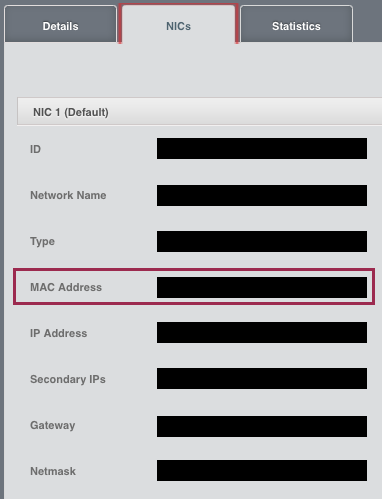
## How Has This Been Tested?
Tested locally to verify that the correct mac address gets displayed in the detail view.
This adds a new API updateVmwareDc that allows admins to update the
VMware datacenter details of a zone. It also recursively updates
the cluster_details for any username/password updates
as well as updates the url detail in cluster_details table and guid
detail in the host_details table with any newly provided vcenter
domain/ip. The update API assumes that there is only one vCenter per
zone. And, since the username/password for each VMware host could be different
than what gets configured for vcenter at zone level, it does not update the
username/password in host_details.

Previously, one has to manually update the db with any new vcenter details for the zone.

Signed-off-by: Rohit Yadav <rohit.yadav@shapeblue.com>
When the “deleteDomain” command is sent via UI, the HTML is already updated assuming that the “deleteDomain” command will actually delete it. However, there are cases (domain with allocated resources) that will not allow ACS to remove the command; as a consequence, the UI will not be in sync with ACS state, which can lead to misunderstandings.
This update changes how the languages are shown on the UI's login page. Previously all languages were shown in the current language of the login page. This meant for instance, that a Japanese speaker would have to know English to find their language. Likewise if the language had been changed, a German speaker might need to speak Korean in order to find their language.

Therefore the UI has been altered to always show the name of each language in the appropriate language.
Fix UI overlay issue in snapshot view on master with new jquery and other changes. This problem was created because of the jQuery-UI upgrade.
This fixes: #2830
In the UI, when Setting up a recurring snapshot for a volume and clicking 'Add', the newly added scheduled snapshot entry is not displayed in the 'Scheduled Snapshots' table. Also, the 'Keep' input field does not limit the length of a number that can be added. This causes the API not return an error that the value is invalid.
After adding a recurring snapshot, it must display in the 'Scheduled Snapshots' table. The 'Keep' input field must restrain a user from entering too large of a number.
* 4.11:
Changed the implementation of isVolumeOnManagedStorage(VolumeInfo) to check if the data store in question is for primary storage (and added a unit test from Daan Hoogland)
vmware: reboot VR after mac updates (#2794)
This re-introduces the rebooting of VR after setup of nics/macs in
case of VMware. It also adds a minor enhancement to show the console
esp. for root admins when VRs and systemvms are in starting state.
Signed-off-by: Rohit Yadav <rohit.yadav@shapeblue.com>
In the UI, when a VM instance has more than one NIC, the NICs screen does not display all the details of the first NIC. The last few rows of text overlap with the second NIC's text. This is due to the incorrect placement of the second NIC's bar. The default height sizing does not allow enough head space to display all the details of the first NIC before displaying the second NIC's details.
Expected Behaviour:
When a VM instance has more than one NIC, the NICs screen must allow enough height size to display all the details of the first NIC before displaying the second NIC's details. The last few rows of text must not overlap with the second NIC's text.
Current Behaviour:
When a VM instance has more than one NIC, the NICs screen does not allow enough height size to display all the details of the first NIC before displaying the second NIC's details. The last few rows of text overlap with the second NIC's text.
To Reproduce:
In the UI, on the lefthand side, select the Instances link. On the Instances screen, select a VM instance that has more than one NIC and then select the NICs screen. Scroll down to where the second NIC bar is displayed. Notice that it does not display all the details of the first NIC correctly. The last few rows of text overlap with the second NIC's text.
In the UI, when a user navigates to a screen that displays a table of data and hovers the mouse over a sortable column header, the cursor does not change to a hand pointer, indicating to the user that it can be clicked on, in order to sort the table's data rows according to that column.
When the mouse hovers over the non-sortable 'Quickview' column header, it incorrectly displays a hand pointer cursor instead of a default cursor.
When the mouse hovers over a column header, it also does not display the column header's value as a tooltip.
Expected Behaviour:
The cursor type for a sortable column header must display a hand pointer.
The cursor type for the non-sortable 'Quickview' column header must display a default pointer.
When the mouse hovers over a column header it must display the column header's value as a tooltip.
Actual Behaviour:
The cursor type for a sortable column header incorrectly displays a default pointer.
The cursor type for the non-sortable 'Quickview' column header incorrectly displays a hand pointer.
When the mouse hovers over a column header it does not display the column header's value as a tooltip.
To Reproduce:
In the UI, navigate to a screen that displays a table of data and hover the mouse over a sortable column header, the cursor does not change to a hand pointer.
Hover the mouse over the non-sortable 'Quickview' column header and notice that it incorrectly displays a hand pointer cursor instead of a default cursor.
Hover the mouse over a column header and notice that it does not display the column header's value as a tooltip.
When a regular user navigates to the Dashboard screen and hovers over the 'Latest events' entries, the mouse cursor changes to a hand pointer, but it cannot select any of these entries.
Expected Behaviour:
When a user navigates to the Dashboard screen and hovers over the 'Latest events' entries, the mouse cursor must not change to a hand pointer. This will allow the user to make the correct interpretation that the 'Latest events' entries are not selectable.
Actual Behaviour:
When a user navigates to the Dashboard screen and hovers over the 'Latest events' entries, the mouse cursor changes to a hand pointer. This causes a user to incorrectly interpret that the entries are selectable.
To Reproduce:
Log in to the Cloudstack UI as a regular User.
On the Dashboard screen, hover the mouse over the 'Latest events' entries, the cursor changes to a hand pointer. Confirm that the entries cannot be selected.
In the index.html file, the reference to the custom.css file is made on the last line of the <head> tag.
The plugins.js file appends a list of CSS files to the <head> tag dynamically, consequently placing them after the custom.css file and overriding it.
Expected Behaviour:
The plugins.js file must insert the list of CSS files before the custom.css file so that it does not get overridden.
Actual Behaviour:
The plugins.js file appends a list of CSS files to the <head> tag dynamically, consequently placing them after the custom.css file and overriding it.
To Reproduce:
Log in to the Cloudstack UI using your favourite browser.
Use your browser's development tool to view the HTML elements of the index.html loaded in memory.
Expand the <head> element and review the list of CSS <link> elements.
Notice that the list of module and plugins CSS files is appended after the custom.css file.
On the 'NICs' tab, when a user clicks the 'Add network to VM' button to add a network to a VM, the 'Add network to VM' popup screen does not have an IP Address input field to allow a user to define a specific IP Address for a NIC. A user can specify the IP address for the first NIC when creating a VM instance, but cannot do that for subsequent NICs when adding a network to a VM.
To Reproduce:
Go to the 'Instances' screen by clicking the 'Instances' tab on the lefthand side.
On the 'Instances' screen click on a specific VM instance name.
This will open the 'Details' tab for the specific VM instance.
Click on the 'NICs' tab and then click on the 'Add network to VM' button to add a network to a VM.
The 'Add network to VM' popup screen will display.
Actual Behaviour:
The 'Add network to VM' popup screen does not have an IP Address input field to allow a user to define a specific IP Address for a NIC.
Expected behaviour:
The 'Add network to VM' popup screen must have an IP Address input field to allow a user to define a specific IP Address for a NIC.
Since the addNicToVirtualMachine API's ipaddress field is not required, the IP Address input field is also not a required field.
The IP Address input field must be validated for a valid IPv4 formatted value if the user enters anything into the field.
The valid user-specified IPv4 IP Address value must be allocated to the NIC if it is within the acceptable IP range for the chosen Network.
On the 'Register Template From URL' screen, when a user selects the VMware option from the Hypervisor dropdown:
It incorrectly displays the 'HVM' checkbox.
This checkbox must be hidden in the VMware context.
This checkbox must still be visible in any other hypervisor context.
To Reproduce:
Go to the 'Register Template From URL' screen by clicking the 'Templates' tab on the lefthand side.
On the 'Templates' screen click the 'Add' button to display the 'Register Template From URL' screen.
On the 'Register Template From URL' screen, select the VMware option from the Hypervisor dropdown:
Actual Behaviour:
It incorrectly displays the 'HVM' checkbox.
Expected behaviour:
This checkbox must be hidden in the VMware context.
This checkbox must still be visible in any other hypervisor context.
In the UI, on the Instances screen, the Quickview popup window and the Details window do not display the 'Reset SSH Key Pair' button for VMs in a running state. They only display when the VM is in a stopped state. This is inconsistent with the 'Reset Password' button behaviour, where it displays in both VM states: running and stopped. This fixes the issue so that the 'Reset SSH Key Pair' button also displays in both VM states.
Expected Behaviour:
In the UI, on the Instances screen, the Quickview popup window and the Details window must display the 'Reset SSH Key Pair' button in both VM states: running and stopped. When a user clicks on the 'Reset SSH Key Pair' button and a VM is in a running state, it will display a message "Vm xxx should be stopped to do SSH Key reset".
Actual Behaviour:
In the UI, on the Instances screen, the Quickview popup window and the Details window do not display the 'Reset SSH Key Pair' button for VMs in a running state. It only displays when the VM is in a stopped state.
In the Add Zone Wizard, when a user lands on the Physical Network page, by default the first Physical Network gets initialized with the 3 Traffic Types: Guest, Management and Public. When a user drags the Management or Public Traffic Types from the first Physical Network to a second or nth Physical Network and then clicks the next button to go to the next screen, and then decides to click the previous button to go back to the Physical Network screen, the UI initializes the physicalNetwork again and thus moves these Traffic Types back to their original position in the first Physical Network as if it is the first time the user navigated to this page.
A fix was made so that when a user clicks the previous button to go back to the Physical Network screen, it does not initialize the physicalNetwork again, therefore leaving the user-defined Traffic Type configuration as it was before the next button was clicked.
On the 'Register Template From URL' screen, when a user selects the KVM option from the Hypervisor dropdown:
1) It incorrectly displays the 'Original XS Version is 6.1' checkbox. This checkbox should be hidden in the KVM context.
2) The 'Root Disk Controller' dropdown should display the default option of 'osdefault' instead of a blank default option.
There was a concurrency problem with the “moveNetworkAclItem” API method. If two users were changing the ACL rules order at the same time, this could lead to inconsistent actions.
To solve the problem we added a “consistency check ” parameter, which is used to hold the consistency hash. This hash is created using an MD5 hash function on a String that is created with all ACL rules UUIDs concatenated in their order, which is defined via the ‘number’ field.
We also lock the editing of the ACL while executing the upgrade. This allows us to handle race conditions nicely, and present a good feedback for the user.
* [CLOUDSTACK-9261] Upgrate jQuery-UI to 1.11 (JQuery UI 1.8.4 prone to XSS)
* fix problems in the UI for lbCertificatePolicy and StaticNAT
* force jenkins build
* Fix about dialog
* Fix position of network service offering
* 4.11:
comment on unencryption
ui: fix create VPC dialog box failure when zone is SG enabled (#2704)
CLOUDSTACK-10381: Fix password reset / reset ssh key with ConfigDrive
isisnot=
extra message
debug message
imports
update without decrypt doesn't work
set unsensitive attributes as not 'Secure'
remove old config artifacts from update path
This introduces a rolling restart of VRs when networks are restarted
with cleanup option for isolated and VPC networks. A make redundant option is
shown for isolated networks now in UI.
Signed-off-by: Rohit Yadav <rohit.yadav@shapeblue.com>
Supporting ConfigDrive user data on L2 networks.
Add UI checkbox to create L2 network offering with config drive.
Signed-off-by: Rohit Yadav <rohit.yadav@shapeblue.com>
* CLOUDSTACK-10147 Disabled Xenserver Cluster can still deploy VM's. Added code to skip disabled clusters when selecting a host (#2442)
(cherry picked from commit c3488a51db)
Signed-off-by: Rohit Yadav <rohit.yadav@shapeblue.com>
* CLOUDSTACK-10318: Bug on sorting ACL rules list in chrome (#2478)
(cherry picked from commit 4412563f19)
Signed-off-by: Rohit Yadav <rohit.yadav@shapeblue.com>
* CLOUDSTACK-10284:Creating a snapshot from VM Snapshot generates error if hypervisor is not KVM.
Signed-off-by: Rohit Yadav <rohit.yadav@shapeblue.com>
* CLOUDSTACK-10221: Allow IPv6 when creating a Basic Network (#2397)
Since CloudStack 4.10 Basic Networking supports IPv6 and thus
should be allowed to be specified when creating a network.
Signed-off-by: Wido den Hollander <wido@widodh.nl>
(cherry picked from commit 9733a10ecd)
Signed-off-by: Rohit Yadav <rohit.yadav@shapeblue.com>
* CLOUDSTACK-10214: Unable to remove local primary storage (#2390)
Allow admins to remove primary storage pool.
Cherry-picked from eba2e1d8a1
Signed-off-by: Rohit Yadav <rohit.yadav@shapeblue.com>
* dateutil: constistency of tzdate input and output (#2392)
Signed-off-by: Yoan Blanc <yoan.blanc@exoscale.ch>
Signed-off-by: Daan Hoogland <daan.hoogland@shapeblue.com>
(cherry picked from commit 2ad5202823)
Signed-off-by: Rohit Yadav <rohit.yadav@shapeblue.com>
* CLOUDSTACK-10054:Volume download times out in 3600 seconds (#2244)
(cherry picked from commit bb607d07a9)
Signed-off-by: Rohit Yadav <rohit.yadav@shapeblue.com>
* When creating a new account (via domain admin) it is possible to select “root admin” as the role for the new user (#2606)
* create account with domain admin showing 'root admin' role
Domain admins should not be able to assign the role of root admin to new users. Therefore, the role ‘root admin’ (or any other of the same type) should not be visible to domain admins.
* License and formatting
* Break long sentence into multiple lines
* Fix wording of method 'getCurrentAccount'
* fix typo in variable name
* [CLOUDSTACK-10259] Missing float part of secondary storage data in listAccounts
* [CLOUDSTACK-9338] ACS not accounting resources of VMs with custom service offering
ACS is accounting the resources properly when deploying VMs with custom service offerings. However, there are other methods (such as updateResourceCount) that do not execute the resource accounting properly, and these methods update the resource count for an account in the database. Therefore, if a user deploys VMs with custom service offerings, and later this user calls the “updateResourceCount” method, it (the method) will only account for VMs with normal service offerings, and update this as the number of resources used by the account. This will result in a smaller number of resources to be accounted for the given account than the real used value. The problem becomes worse because if the user starts to delete these VMs, it is possible to reach negative values of resources allocated (breaking all of the resource limiting for accounts). This is a very serious attack vector for public cloud providers!
* [CLOUDSTACK-10230] User should not be able to use removed “Guest OS type” (#2404)
* [CLOUDSTACK-10230] User is able to change to “Guest OS type” that has been removed
Users are able to change the OS type of VMs to “Guest OS type” that has been removed. This becomes a security issue when we try to force users to use HVM VMs (Meltdown/Spectre thing). A removed “guest os type” should not be usable by any users in the cloud.
* Remove trailing lines that are breaking build due to checkstyle compliance
* Remove unused imports
* fix classes that were in the wrong folder structure
* Updates to capacity management
This adds and allows Ubuntu 18.04 to be used as KVM host. In addition,
on the UI when hypervisor version key is missing, this adds and display
the host os and version detail which is useful to show the KVM host
os and version.
When cache mode 'none' is used for empty cdrom drives, systemvms
and guest VMs fail to start on newer libvirtd such as Ubuntu bionic.
The fix is ensure that cachemode is not declared when drives are empty
upon starting of the VM. Similar issue logged at redhat here:
https://bugzilla.redhat.com/show_bug.cgi?id=1342999
The workaround is to ensure that we don't configure cachemode for
cdrom devices at all. This also fixes live VM migration issue.
Signed-off-by: Rohit Yadav <rohit.yadav@shapeblue.com>
After using the feature introduced by #2486 in production, we felt the need for an improvement in the UI. It is interesting to filter the displayed disk offerings according to the type of storage selected (local/shared) to migrate the volume to.
This fixes SAML2 certificate encoding/decoding issue due to refactoring
regression introduced in 7ce54bf7a8 that
did not account for base64 based encoding/decoding. The changes
effectively restore the same logic as used in previous versions.
Signed-off-by: Rohit Yadav <rohit.yadav@shapeblue.com>
* [CLOUDSTACK-5235] Force users to enter old password when updating password
* Formatting for checkstyle
* Remove an unused import in AccountManagerImpl
* Apply Nitin's suggestions
* Change 'oldPassword' to 'currentPassword'
* Second review of Resmo
* Fix typos found by Nitin
* [CLOUDSTACK-10323] Allow changing disk offering during volume migration
This is a continuation of work developed on PR #2425 (CLOUDSTACK-10240), which provided root admins an override mechanism to move volumes between storage systems types (local/shared) even when the disk offering would not allow such operation. To complete the work, we will now provide a way for administrators to enter a new disk offering that can reflect the new placement of the volume. We will add an extra parameter to allow the root admin inform a new disk offering for the volume. Therefore, when the volume is being migrated, it will be possible to replace the disk offering to reflect the new placement of the volume.
The API method will have the following parameters:
* storageid (required)
* volumeid (required)
* livemigrate(optional)
* newdiskofferingid (optional) – this is the new parameter
The expected behavior is the following:
* If “newdiskofferingid” is not provided the current behavior is maintained. Override mechanism will also keep working as we have seen so far.
* If the “newdiskofferingid” is provided by the admin, we will execute the following checks
** new disk offering mode (local/shared) must match the target storage mode. If it does not match, an exception will be thrown and the operator will receive a message indicating the problem.
** we will check if the new disk offering tags match the target storage tags. If it does not match, an exception will be thrown and the operator will receive a message indicating the problem.
** check if the target storage has the capacity for the new volume. If it does not have enough space, then an exception is thrown and the operator will receive a message indicating the problem.
** check if the size of the volume is the same as the size of the new disk offering. If it is not the same, we will ALLOW the change of the service offering, and a warning message will be logged.
We execute the change of the Disk offering as soon as the migration of the volume finishes. Therefore, if an error happens during the migration and the volume remains in the original storage system, the disk offering will keep reflecting this situation.
* Code formatting
* Adding a test to cover migration with new disk offering (#4)
* Adding a test to cover migration with new disk offering
* Update test_volumes.py
* Update test_volumes.py
* fix test_11_migrate_volume_and_change_offering
* Fix typo in Java doc
This extends securing of KVM hosts to securing of libvirt on KVM
host as well for TLS enabled live VM migration. To simplify implementation
securing of host implies that both host and libvirtd processes are
secured with management server's CA plugin issued certificates.
Based on whether keystore and certificates files are available at
/etc/cloudstack/agent, the KVM agent determines whether to use TLS or
TCP based uris for live VM migration. It is also enforced that a secured
host will allow live VM migration to/from other secured host, and an
unsecured hosts will allow live VM migration to/from other unsecured
host only.
Post upgrade the KVM agent on startup will expose its security state
(secured detail is sent as true or false) to the managements server that
gets saved in host_details for the host. This host detail can be accesed
via the listHosts response, and in the UI unsecured KVM hosts will show
up with the host state of ‘unsecured’. Further, a button has been added
that allows admins to provision/renew certificates to KVM hosts and can
be used to secure any unsecured KVM host.
The `cloudstack-setup-agent` was modified to accept a new flag `-s`
which will reconfigure libvirtd with following settings:
listen_tcp=0
listen_tls=1
tcp_port="16509"
tls_port="16514"
auth_tcp="none"
auth_tls="none"
key_file = "/etc/pki/libvirt/private/serverkey.pem"
cert_file = "/etc/pki/libvirt/servercert.pem"
ca_file = "/etc/pki/CA/cacert.pem"
For a connected KVM host agent, when the certificate are
renewed/provisioned a background task is scheduled that waits until all
of the agent tasks finish after which libvirt process is restarted and
finally the agent is restarted via AgentShell.
There are no API or DB changes.
Signed-off-by: Rohit Yadav <rohit.yadav@shapeblue.com>
While executing the find/replace, I found some blocks of duplicated code. Therefore, I extracted the duplicated part to an utils file, and then removed the duplicated blocks.
We no longer hash password in the user side. All of the password processing is executed in the server side according to the priority of hashing mechanism defined by the administrator.
The host/alert dashboard panels are on the top side, the dashboard
statistics page gets less room. This increases the panel by 100px for
zone dashboard and decreases the host/alert panels by 100px.
Signed-off-by: Rohit Yadav <rohit.yadav@shapeblue.com>
* [CLOUDSTACK-10314] Add Text-Field to each ACL Rule
It is interesting to have a text field (e.g. CHAR-256) added to each ACL rule, which allows to enter a "reason" for each FW Rule created. This is valuable for customer documentation, as well as best practice for an evidence towards auditing the system
* Formatting to make check style happy and code clean ups
 Abhishek Kumar
 davidjumani
 Ritchie Vincent
 Pearl Dsilva
 Rohit Yadav
 Ritchie Vincent
 Florian Symanowski
 Hoang Nguyen
 Rohit Yadav
 Gregor Riepl
 Gregor Riepl
 Greg Goodrich
 Anurag Awasthi
 Philipp Bankonier
 M. Weber
 Philipp Bankonier
 Spaceman1984
 Gabriel Beims Bräscher
 Wei Zhou
 nvazquez
 Harikrishna Patnala
 Rodrigo D. Lopez
 Rakesh
 dahn
dahn
 Daan Hoogland
 pavanaravapalli
 Paul Angus
 Radu Todirica
 Anurag Awasthi
 Andrija Panic
 EK
EK
 nuageci
 smlshn
 Abhishek Kumar
 Nico Wohlfarth
 Dingane Hlaluku
 Richard Lawley
 Vladimir Melnik
 Anurag Awasthi
 ustcweizhou
 dahn
dahn
 Frank Maximus
 Nico Wohlfarth
 Gabriel Beims Bräscher
 Frank Maximus
 Dingane Hlaluku
 Gerd Müller
 Henko
Henko
 Rafael Weingärtner
 ernjvr
 Mike Tutkowski
 Mike Tutkowski
 Khosrow Moossavi
 Olivier Lemasle
 Rene Moser
