Problem: In Vmware, appliances that have options that are required to be answered before deployments are configurable through vSphere vCenter user interface but it is not possible from the CloudStack user interface.

Root cause: CloudStack does not handle vApp configuration options during deployments if the appliance contains configurable options. These configurations are mandatory for VM deployment from the appliance on Vmware vSphere vCenter. As shown in the image below, Vmware detects there are mandatory configurations that the administrator must set before deploy the VM from the appliance (in red on the image below):

Solution:
On template registration, after it is downloaded to secondary storage, the OVF file is examined and OVF properties are extracted from the file when available.
OVF properties extracted from templates after being downloaded to secondary storage are stored on the new table 'template_ovf_properties'.
A new optional section is added to the VM deployment wizard in the UI:
If the selected template does not contain OVF properties, then the optional section is not displayed on the wizard.
If the selected template contains OVF properties, then the optional new section is displayed. Each OVF property is displayed and the user must complete every property before proceeding to the next section.
If any configuration property is empty, then a dialog is displayed indicating that there are empty properties which must be set before proceeding
image
The specific OVF properties set on deployment are stored on the 'user_vm_details' table with the prefix: 'ovfproperties-'.
The VM is configured with the vApp configuration section containing the values that the user provided on the wizard.
* Allow users to share templates with Accounts or Projects through the
updateTemplate permissions API

* Change behaviour to show only supported projects and accounts with update template permissions

* Allow admins to see accounts dropdown and only hide lists for users

* Don't allow sharing project owned templates as you cannot retrieve them in list api calls
Currently an admin can choose which host a VM is to be started on.
They should be able to 'override' the allocation algorthm to a greater
or lesser extent at will, and be able to choose the pod, cluster or host
that they wish a new VM to be deployed in.

DeployVirtualMachine API has been extended with additional, optional
parameters podid and clusterid that will be passed to and used in the
deployment planner, when selecting a viable host. If the user supplies
a pod, a suitable host in the given pod will be selected. If the user
supplies a cluster, a suitable host in the given cluster will be selected.

Based on the parameter supplied and on passing validation, the VM will
then be deployed on the selected host, cluster or pod.
Added a shortcut to take a volume snapshot of a VM directly from the instance view. Therefor an option was added to the quick view tooltip. On activation a new dialog will pop up, which is based on the original dialog for creating a volume snapshot (Storage > Volumes > Take snapshot) extended with a select menu to choose the desired snapshot volume of the VM.
Problem: Admins don’t want to charge for IP address usage on certain (shared) networks.
Root Cause: There is no flag or detail for admins to provide using UI or API when creating networks to specify if they want IP address usage of the network hidden.
Solution: A new boolean hideipaddressusage flag is added to the createNetwork API and a checkbox in the ‘Add guest network’ UI for the root admins to specify if they want the shared network’s IP address usage to be hidden in the listUsageRecords API response. The provided flag is saved as the ‘hideIpAddressUsage’ detail in the cloud.network_details table for the network. For existing (shared) networks, root admins can also specify the same boolean API parameter hideipaddressusage with the updateNetwork API request to configure the behaviour for an existing network. When the detail/flag is true, the IP address usage for the (shared) network is not exported in the listUsageRecords API response. The listNetworks API response will include the details of a network for root admin only. (note usage is still recorded in the usage database but not return by the listUsageRecords API)

The API flag works for any kind of network via the API, but the checkbox is only shown while creating shared networks in the UI.

Signed-off-by: Rohit Yadav <rohit.yadav@shapeblue.com>
Problem: Users can register ISOs from URL but cannot upload local ISOs.

Root cause: CloudStack provides browser-based upload support for volumes and templates, but ISOs are not supported.

Solution:
The existing browser-based upload from local functionality for templates and volumes (https://cwiki.apache.org/confluence/pages/viewpage.action?pageId=39620237) is extended to support uploading local ISOs.

Extend the UI: A new button is created under the ISOs view: 'Upload from Local'. A new dialog form is displayed in which the user must select the ISO to upload from its local file system.
Extend the API: New 'GetUploadParamsForIso' API command is created to handle the ISO upload.
To make sure that a qemu2-image won't be corrupted by the snapshot deletion procedure which is being performed after copying the snapshot to a secondary store, I'd propose to put a VM in to suspended state.
Additional reference: https://bugzilla.redhat.com/show_bug.cgi?id=920020#c5Fixes#3193
We want to support hiding table columns, specifically in metrics table, through config file so that users can make the relevant bits hidden as per their organization. Current work will support the metrics table but can be extended to any table with minimal work in future.

Config file will take the key of the metrics column from metrics.js file for the sake of minimal changes and simplicity of development.

Problem: The keyboard list in the UI is not consistent across views such as in the instance wizard and in the register template form. There is also no way to custom about url/text and doc title and help URL in the UI.
Root Cause: The list is hardcoded in the UI allowing no centralised configuration.
Solution: Introduce a new config.js file installed at the /usr/share/cloudstackmanagement/webapp/config.js location. The config.js allows configurable keyboard list, about url/text, doc title, and help URL.

Signed-off-by: Rohit Yadav <rohit.yadav@shapeblue.com>
This change allows instance Settings tab to be visible but inaccessible when instance is running. A warning is shown when user tries to access Settings for a running instance and tab content is greyed out.
It also allows some admin defined instance settings/details to be made static for user. User will be able to see them in instance settings tab but cannot change their values as action buttons are disabled and greyed out. This can be achieved by providing a comma-separated list details for global settings key 'user.vm.readonly.ui.details'. A new value 'readonlyuidetails' has been added in UserVMResponse for UI manipulate editing functionality of settings/details.

Signed-off-by: Abhishek Kumar <abhishek.mrt22@gmail.com>
Allows creating storage offerings associated with particular domain(s) and zone(s). In create disk/storage offfering form UI, a mult-select control has been addded to select desired zone(s) and domain select element has been made multi-select.
createDiskOffering API has been modified to allow passing list of domain and zone IDs with keys domainids and zoneids respectively. These lists are stored in DB in cloud.disk_offering_details table with 'domainids' and 'zoneids' key as string of comma separated list of IDs. Response for create, update and list disk offering APIs will return domainids, domainnames, zoneids and zonenames in details object of offering.
listDiskOfferings API has been modified to allow passing zoneid to return only offerings which are associated with the zone.

Signed-off-by: Abhishek Kumar <abhishek.mrt22@gmail.com>
Problem: Custom compute offering does not allow setting min and max values for CPU and VRAM for custom VMs.

Root Cause: Custom compute offerings cannot be created with a given range of CPU number and memory instead it allows only fixed values.

Solution: createServiceOffering API has been modified to allow setting a defined range for CPU number and memory. Also, UI form for compute offering creation is provided with a new field named 'compute offering type’ with values - Fixed, Custom Constrained, Custom Constrained. It will allow the creation of compute offerings either with a fixed CPU speed and memory for fixed compute offering, or with a range of CPU number and memory for custom constrained compute offering or without predefined CPU number, CPU speed and memory for custom unconstrained compute offering.

To allow the user to set CPU number, CPU speed and memory during VM deployment, UI form for VM deployment has been modified to provide controls to change these values. These controls are depicted in screenshots below for custom constrained and custom unconstrained compute offering types.

Sample API calls using cmk to create a constrained service offering and deploying a VM using it,

create serviceoffering name=Constrained displaytext=Constrained customized=true mincpunumber=2 maxcpunumber=4 cpuspeed=400 minmemory=256 maxmemory=1024

deploy virtualmachine displayname=ConstrainedVM serviceofferingid=60f3e500-6559-40b2-9a61-2192891c2bd6 templateid=8e0f4a3e-601b-11e9-9df4-a0afbd4a2d60 zoneid=9612a0c6-ed28-4fae-9a48-6eb207af29e3 details[0].cpuNumber=3 details[0].memory=800

Signed-off-by: Abhishek Kumar <abhishek.kumar@shapeblue.com>
* api: add command to list management servers

* api: add number of mangement servers in listInfrastructure command

* ui: add block for mangement servers on infra page

* api name resolution method cleanup
This PR adds the possibility to select a checkbox for the parameter bypassvlanoverlapcheck to the ajax request createNetwork. The checkbox was added for Guest Network as well as for the L2 Guest Network. For L2 Guest Network a backend check for the existence of the flag bypassvlanoverlapcheck was added.
## Description
Adds the MAC address to the NICs detail view of an instance.
## Types of changes
- [ ] Breaking change (fix or feature that would cause existing functionality to change)
- [ ] New feature (non-breaking change which adds functionality)
- [ ] Bug fix (non-breaking change which fixes an issue)
- [x] Enhancement (improves an existing feature and functionality)
- [ ] Cleanup (Code refactoring and cleanup, that may add test cases)
## Screenshots:
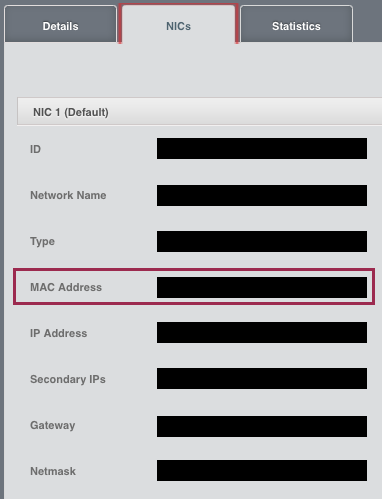
## How Has This Been Tested?
Tested locally to verify that the correct mac address gets displayed in the detail view.
This adds a new API updateVmwareDc that allows admins to update the
VMware datacenter details of a zone. It also recursively updates
the cluster_details for any username/password updates
as well as updates the url detail in cluster_details table and guid
detail in the host_details table with any newly provided vcenter
domain/ip. The update API assumes that there is only one vCenter per
zone. And, since the username/password for each VMware host could be different
than what gets configured for vcenter at zone level, it does not update the
username/password in host_details.

Previously, one has to manually update the db with any new vcenter details for the zone.

Signed-off-by: Rohit Yadav <rohit.yadav@shapeblue.com>
* [CLOUDSTACK-5235] Force users to enter old password when updating password

* Formatting for checkstyle

* Remove an unused import in AccountManagerImpl

* Apply Nitin's suggestions

* Change 'oldPassword' to 'currentPassword'

* Second review of Resmo

* Fix typos found by Nitin
* [CLOUDSTACK-10323] Allow changing disk offering during volume migration

This is a continuation of work developed on PR #2425 (CLOUDSTACK-10240), which provided root admins an override mechanism to move volumes between storage systems types (local/shared) even when the disk offering would not allow such operation. To complete the work, we will now provide a way for administrators to enter a new disk offering that can reflect the new placement of the volume. We will add an extra parameter to allow the root admin inform a new disk offering for the volume. Therefore, when the volume is being migrated, it will be possible to replace the disk offering to reflect the new placement of the volume.

The API method will have the following parameters:

* storageid (required)
* volumeid (required)
* livemigrate(optional)
* newdiskofferingid (optional) – this is the new parameter

The expected behavior is the following:

* If “newdiskofferingid” is not provided the current behavior is maintained. Override mechanism will also keep working as we have seen so far.
* If the “newdiskofferingid” is provided by the admin, we will execute the following checks
** new disk offering mode (local/shared) must match the target storage mode. If it does not match, an exception will be thrown and the operator will receive a message indicating the problem.
** we will check if the new disk offering tags match the target storage tags. If it does not match, an exception will be thrown and the operator will receive a message indicating the problem.
** check if the target storage has the capacity for the new volume. If it does not have enough space, then an exception is thrown and the operator will receive a message indicating the problem.
** check if the size of the volume is the same as the size of the new disk offering. If it is not the same, we will ALLOW the change of the service offering, and a warning message will be logged.

We execute the change of the Disk offering as soon as the migration of the volume finishes. Therefore, if an error happens during the migration and the volume remains in the original storage system, the disk offering will keep reflecting this situation.

* Code formatting

* Adding a test to cover migration with new disk offering (#4)

* Adding a test to cover migration with new disk offering

* Update test_volumes.py

* Update test_volumes.py

* fix test_11_migrate_volume_and_change_offering

* Fix typo in Java doc
This extends securing of KVM hosts to securing of libvirt on KVM
host as well for TLS enabled live VM migration. To simplify implementation
securing of host implies that both host and libvirtd processes are
secured with management server's CA plugin issued certificates.

Based on whether keystore and certificates files are available at
/etc/cloudstack/agent, the KVM agent determines whether to use TLS or
TCP based uris for live VM migration. It is also enforced that a secured
host will allow live VM migration to/from other secured host, and an
unsecured hosts will allow live VM migration to/from other unsecured
host only.

Post upgrade the KVM agent on startup will expose its security state
(secured detail is sent as true or false) to the managements server that
gets saved in host_details for the host. This host detail can be accesed
via the listHosts response, and in the UI unsecured KVM hosts will show
up with the host state of ‘unsecured’. Further, a button has been added
that allows admins to provision/renew certificates to KVM hosts and can
be used to secure any unsecured KVM host.

The `cloudstack-setup-agent` was modified to accept a new flag `-s`
which will reconfigure libvirtd with following settings:

    listen_tcp=0
    listen_tls=1
    tcp_port="16509"
    tls_port="16514"
    auth_tcp="none"
    auth_tls="none"
    key_file = "/etc/pki/libvirt/private/serverkey.pem"
    cert_file = "/etc/pki/libvirt/servercert.pem"
    ca_file = "/etc/pki/CA/cacert.pem"

For a connected KVM host agent, when the certificate are
renewed/provisioned a background task is scheduled that waits until all
of the agent tasks finish after which libvirt process is restarted and
finally the agent is restarted via AgentShell.

There are no API or DB changes.

Signed-off-by: Rohit Yadav <rohit.yadav@shapeblue.com>
* [CLOUDSTACK-10314] Add Text-Field to each ACL Rule

It is interesting to have a text field (e.g. CHAR-256) added to each ACL rule, which allows to enter a "reason" for each FW Rule created. This is valuable for customer documentation, as well as best practice for an evidence towards auditing the system

* Formatting to make check style happy and code clean ups
The ACL rules editing/addition page is not user-friendly. Users are not able to see in a single view all of the detail of the ACL rule (they need to use a scroll bar on the horizontal). The problem becomes worse when there are a considerable number of rules. Therefore, we are proposing the following changes:

1- Instead of using the table to create new ACL, we can create a button like the one presented in attached pictures, where users can click, and then a modal popup would appear and users would be able to create the new ACL there. This is similar to the workings of the ACL edit button.
2 - Remove the ability to add new ACL via table where they are presented. All ACLs should be entered via the “New ACL” button. Therefore, the section “Add ACL” would be removed as well;
3 - Move the action section of the list ACL table to the most left position;

These changes would reduce the information in the table and facilitate users to add new rules and easily edit them as well.
CloudStack volumes and templates are one single virtual disk in case of XenServer/XCP and KVM hypervisors since the files used for templates and volumes are virtual disks (VHD, QCOW2). However, VMware volumes and templates are in OVA format, which are archives that can contain a complete VM including multiple VMDKs and other files such as ISOs. And currently, Cloudstack only supports Template creation based on OVA files containing a single disk. If a user creates a template from a OVA file containing more than 1 disk and launches an instance using this template, only the first disk is attached to the new instance and other disks are ignored.
Similarly with uploaded volumes, attaching an uploaded volume that contains multiple disks to a VM will result in only one VMDK to being attached to the VM.

FS: https://cwiki.apache.org/confluence/display/CLOUDSTACK/Support+OVA+files+containing+multiple+disks

This behavior needs to be improved in VMWare to support OVA files with multiple disks for both uploaded volumes and templates. i.e. If a user creates a template from a OVA file containing more than 1 disk and launches an instance using this template, the first disk should be attached to the new instance as the ROOT disk and volumes should be created based on other VMDK disks in the OVA file and should be attached to the instance.

Signed-off-by: Abhinandan Prateek <abhinandan.prateek@shapeblue.com>
Signed-off-by: Rohit Yadav <rohit.yadav@shapeblue.com>
This feature allows using templates and ISOs avoiding secondary storage as intermediate cache on KVM. The virtual machine deployment process is enhanced to supported bypassed registered templates and ISOs, delegating the work of downloading them to primary storage to the KVM agent instead of the SSVM agent.

Template and ISO registration:
- When hypervisor is KVM, a checkbox is displayed with 'Direct Download' label.
- API methods registerTemplate and registerISO are both extended with this new parameter directdownload.
- On template or ISO registration, no download job is sent to SSVM agent, CloudStack would only persist an entry on template_store_ref indicating that template or ISO has been marked as 'Direct Download' (bypassing Secondary Storage). These entries are persisted as:
template_id = Template or ISO id on vm_template table
store_id NULL
download_state = BYPASSED
state = Ready
(Note: these entries allow users to deploy virtual machine from registered templates or ISOs)
- An URL validation command is sent to a random KVM host to check if template/ISO location can be reached. Metalink are also supported by this feature. In case of a metalink, it is fetched and URL check is performed on each of its URLs.
- Checksum should be provided as indicated on #2246: {ALGORITHM}CHKSUMHASH
- After template or ISO is registered, it would be displayed in the UI

Virtual machine deployment:
When a 'Direct Download' template is selected for deployment, CloudStack would delegate template downloading to destination storage pool via destination host by a new pluggable download manager.
Download manager would handle template downloading depending on URL protocol. In case of HTTP, request headers can be set by the user via vm_template_details. Those details should be persisted as:
Key: HTTP_HEADER
Value: HEADERNAME:HEADERVALUE

In case of HTTPS, a new API method is added uploadTemplateDirectDownloadCertificate to allow user importing a client certificate into all KVM hosts' keystore before deployment.
After template or ISO is downloaded to primary storage, usual entry would be persisted on template_spool_ref indicating the mapping between template/ISO and storage pool.
This feature allow admins to dedicate a range of public IP addresses to the SSVM and CPVM, such that they can be subject to specific external firewall rules. The option to dedicate a public IP range to the System VMs (SSVM & CPVM) is added to the createVlanIpRange API method and the UI.

Solution:
Global setting 'system.vm.public.ip.reservation.mode.strictness' is added to determine if the use of the system VM reservation is strict (when true) or preferred (false), false by default.
When a range has been dedicated to System VMs, CloudStack should apply IPs from that range to
the public interfaces of the CPVM and the SSVM depending on global setting's value:

If the global setting is set to false: then CloudStack will use any unused and unreserved public IP
addresses for system VMs only when the pool of reserved IPs has been exhausted
If the global setting is set to true: then CloudStack will fail to deploy the system VM when the pool
of reserved IPs has been exhausted, citing the lack of available IPs.
UI Changes
Under Infrastructure -> Zone -> Physical Network -> Public -> IP Ranges, button 'Account' label is refactored to 'Set reservation'.

When that button is clicked, dialog displayed is also refactored, including a new checkbox 'System VMs' which indicates if range should be dedicated for CPVM and SSVM, and a note indicating its usage.

When clicking on button for any created range, UI dialog displayed indicates whether IP range is dedicated for system vms or not.
* Cleanup and Improve NetUtils

This class had many unused methods, inconsistent names and redundant code.

This commit cleans up code, renames a few methods and constants.

The global/account setting 'api.allowed.source.cidr.list' is set
to 0.0.0.0/0,::/0 by default preserve the current behavior and thus
allow API calls for accounts from all IPv4 and IPv6 subnets.

Users can set it to a comma-separated list of IPv4/IPv6 subnets to
restrict API calls for Admin accounts to certain parts of their network(s).

This is to improve Security. Should an attacker steal the Access/Secret key
of an account he/she still needs to be in a subnet from where accounts are
allowed to perform API calls.

This is a good security measure for APIs which are connected to the public internet.

Signed-off-by: Wido den Hollander <wido@widodh.nl>
- Several systemvmtemplate optimizations
- Uses new macchinina template for running smoke tests
- Switch to latest Debian 9.3.0 release for systemvmtemplate
- Introduce a new `get_test_template` that uses tiny test template
  such as macchinina as defined test_data.py
- rVR related fixes and improvements

Signed-off-by: Rohit Yadav <rohit.yadav@shapeblue.com>
- Fixes timezone issue where dates show up as nvalid in UI
- Introduces new event timeline listing/filtering of events
- Several UI improvements to add columns in list views
- Bulk operations support in instance list view to shutdown and destroy
  multiple-selected VMs (limitation: after operation, redundant entries
  may show up in the list view, refreshing VM list view fixes that)
- Align table thead/tbody to avoid splitting of tables

Signed-off-by: Rohit Yadav <rohit.yadav@shapeblue.com>
This feature allows CloudStack administrators to create layer 2 networks on CloudStack. As these networks are purely layer 2, they don't require IP addresses or Virtual Router, only VLAN is necessary (provided by administrator or assigned by CloudStack). Also, network services should be handled externally, e.g. DNS, DHCP, as they are not provided by L2 networks.
As a consequence, a new Guest Network type is created within CloudStack: L2

Description:
Network offerings and networks support new guest type: L2.
L2 Network offering creation allows administrator to select Specify VLAN or let CloudStack assign it dynamically.
L2 Network creation allows administrator to specify VLAN tag (if network offerings allows it) or simply create network.
VM deployments on L2 networks:
VMs should not IP addresses or any network service
No Virtual Router deployed on network
If Specify VLAN = true for network offering, network gets implemented using a dynamically assigned VLAN
UI changes

A new button is added on Networks tab, available for admins, to allow L2 networks creation
At present, The management IP range can only be expanded under the same subnet. According to existing range, either the last IP can be forward extended or the first IP can be backward extended. But we cannot add an entirely different range from the same subnet. So the expansion of range is subnet bound, which is fixed. But when the range gets exhausted and a user wants to deploy more system VMs, then the operation would fail. The purpose of this feature is to expand the range of management network IPs within the existing subnet. It can also delete and list the IP ranges.

Please refer the FS here: https://cwiki.apache.org/confluence/display/CLOUDSTACK/Expansion+of+Management+IP+Range
This change adds allocatediops to the ListStoragePool API. This applies to managed storage where we have a guaranteed minimum IOPS set. This is useful for monitoring if we have reached the IOPS limit on a storage cluster.
 nuageci
 Nicolas Vazquez
 Rohit Yadav
 Paul Angus
 Anurag Awasthi
 Abhishek Kumar
 Abhishek Kumar
 Nico Wohlfarth
 Rohit Yadav
 Vladimir Melnik
 Anurag Awasthi
 Frank Maximus
 dahn
dahn
 Gerd Müller
 Henko
Henko
 Philipp Bankonier
 Dingane Hlaluku
 Rafael Weingärtner
 Khosrow Moossavi
 Abhinandan Prateek
 Wido den Hollander
 Sigert Goeminne
 Nitin Kumar Maharana
 Syed Mushtaq Ahmed
