* Add jQuery ui stylings to the project

* Adapt stylings to jquery ui stylings

- remove unnecessary (empty) style definitions

* Check if jquery autocomplete is initialized before destroying it

* Use dialog modal option instead of setting z-index styling

- set minimum heigth of dialog

* Swap removeAttr() for prop() since it's not longer recommended as of jQuery 3.0

* Fix reccuring snapshots modal view

* Further style improvements

* More improvements on the instance-wizard (and multi-wizard in general)

* Raise input hints over modal z-index

* Adapt/fix stylings

- center buttons of create form modals
- fix width of select menu in service offerings
- fix width of modal in Network -> VPC -> configure -> static NAT -> aquire new Ip -> enable static nat

* Adapt width of dynamic-input container
Problem: Down arrow key of the vertical scroll bar in the VM deployment wizard does not work.
Root Cause: The computer diagram on the right side in the VM deployment wizard spills its margin on the left causing the arrow key to be blocked.
Solution: Fix the background-position to get the correct position than margin-left for the zone-panel. With the fix, the left size arrow keys and vertical scrollbars are no longer under the diagram image and press-able now.
This allows showing complete domain, ie, domain path for accounts list view and account detail.
Added a new key, domainpath, in AccountResponse.
Fixes#2994
Signed-off-by: Abhishek Kumar <abhishek.mrt22@gmail.com>
Problem: When uploading template or iso in a project, the progress is not seen
Root Cause: When users upload a template/iso in project view, the template/iso is not visible in the all filter. This creates confusion that template/iso has not been uploaded.
Solution: Since the api listtemplates with a projectid acts is a superset of list templates without a project id, we should not ignore the project id when listing templates in all filter.
Using db column instead of VO variable name was causing issue with SQL select statement.
This change fixes the problem by using VO variable for adding conditional.
Fixes#3208
Using db column instead of VO variable name was causing issue with SQL select statement.
This PR fixes the problem by using VO variable for adding conditional.
Additionally in UI listAll parameter was being sent twice in the listVMSnapshot API call. It is fixed with this PR.
Signed-off-by: Abhishek Kumar <abhishek.mrt22@gmail.com>
Problem: When reinstalling a VM, the UI only shows featured templates and not all possible list of allowed templates.
Root Cause: The list of templates for reinstall used featured as filter in ‘listTemplates’ API which did not include all available options.
Solution: The issue is fixed by using the executable template filter of the ‘listTemplates’ API to list all
possible templates that a user is allowed to use to deploy a VM.
Hide multiselectaction buttons when selection is resetted after a action is performed
Use checked prop instead of attr to show/hide triggered selection when box was clicked by a user before.

How to reproduce:

Select one entry in a multiSelect listView (e.g. instance list) and then deselect it again. Now click on the "select all" checkbox. The entries which were clicked previously are not displayed as selected.

Select at least one entry. Use the multiSelectAction buttons to trigger an action. Wait for completion. The list refreshes and no entry is selected but the multiSelectAction buttons are displayed.

Fix:

Use "checked" property instead of the attribute to select all entries. This is necessary because when you checked an entry by clicking on it the property gets set and the browser is preferably using this. So setting the attribute by clicking on the "select all" checkbox had no impact anymore on the checkBox of the previously clicked entries.

Hide the multiSelectAction buttons when the list is refreshed after an action is performed and no element is selected anymore.
This removes CA certificate button from UI as this is not used and
confuses both admin and users how to use it. This may be re-introduced
in future when a use-case can be justified.

Signed-off-by: Rohit Yadav <rohit.yadav@shapeblue.com>
* Fix XenServer Security Groups 'vmops' script

- fix tokens = line.split(':') to tokens = line.split(';')
- fix expected tokens size from 5 to 4
- enhance logs
- remove unused vmops script. The XCP patch points to the vmops script
on the parent folder [1]. Thus, all XenServer versions are considering
the vmops script located at [2].
- fix UI ipv4/ipv6 cidr validator to allow a list of cidirs.

Fixing issue: #3192 Security Group rules not applied at all for
XenServer 6.5 / Advanced Zone
https://github.com/apache/cloudstack/issues/3192

* Update security group rules after VM migration

Add security group rules on target host
Cause: vmops script expected secondary IPs as "0;" but received "0:"

Remove security group network rules on source host.
Cause: destroy_network_rules_for_vm function on vmops script was not
called when migrating VM

* Add unit tests and address reviewers
* api: add command to list management servers

* api: add number of mangement servers in listInfrastructure command

* ui: add block for mangement servers on infra page

* api name resolution method cleanup
* Update jquery, jquery ui, jquery validate and flot to current versions

update jquery to 3.3.1
update jqueryui to 1.12.1
update jquery validate to 1.17.0
update jquery flot to 0.8.3

* Replace deprecated removed jquery functions

* Fix initial tab content loading in detailView

* Fix logout for new jquery version

* Fix tooltip detail displaying for new JQuery version

* Fix view all trigger in detailView for new JQuery version

* Fix breadcrumb click event handler for JQuery update

* Fix displaying of preselected zone in instanceWizard for new jQuery verion
* Remove redundant checkbox that controls the visibility of volumes to delete when destroying VMs

* Change label from Volume IDs to Delete Volumes

* Revert back deleted Volume IDs label
This PR adds the possibility to select a checkbox for the parameter bypassvlanoverlapcheck to the ajax request createNetwork. The checkbox was added for Guest Network as well as for the L2 Guest Network. For L2 Guest Network a backend check for the existence of the flag bypassvlanoverlapcheck was added.
## Description
Adds the MAC address to the NICs detail view of an instance.
## Types of changes
- [ ] Breaking change (fix or feature that would cause existing functionality to change)
- [ ] New feature (non-breaking change which adds functionality)
- [ ] Bug fix (non-breaking change which fixes an issue)
- [x] Enhancement (improves an existing feature and functionality)
- [ ] Cleanup (Code refactoring and cleanup, that may add test cases)
## Screenshots:
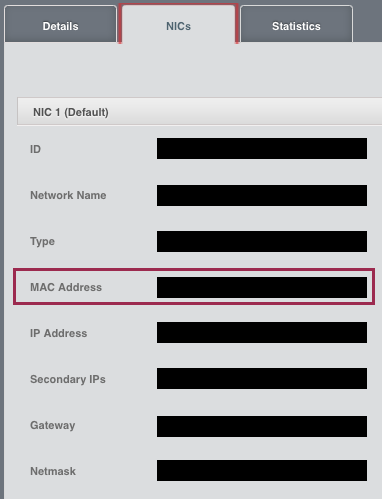
## How Has This Been Tested?
Tested locally to verify that the correct mac address gets displayed in the detail view.
This adds a new API updateVmwareDc that allows admins to update the
VMware datacenter details of a zone. It also recursively updates
the cluster_details for any username/password updates
as well as updates the url detail in cluster_details table and guid
detail in the host_details table with any newly provided vcenter
domain/ip. The update API assumes that there is only one vCenter per
zone. And, since the username/password for each VMware host could be different
than what gets configured for vcenter at zone level, it does not update the
username/password in host_details.

Previously, one has to manually update the db with any new vcenter details for the zone.

Signed-off-by: Rohit Yadav <rohit.yadav@shapeblue.com>
When the “deleteDomain” command is sent via UI, the HTML is already updated assuming that the “deleteDomain” command will actually delete it. However, there are cases (domain with allocated resources) that will not allow ACS to remove the command; as a consequence, the UI will not be in sync with ACS state, which can lead to misunderstandings.
This update changes how the languages are shown on the UI's login page. Previously all languages were shown in the current language of the login page. This meant for instance, that a Japanese speaker would have to know English to find their language. Likewise if the language had been changed, a German speaker might need to speak Korean in order to find their language.

Therefore the UI has been altered to always show the name of each language in the appropriate language.
Fix UI overlay issue in snapshot view on master with new jquery and other changes. This problem was created because of the jQuery-UI upgrade.

This fixes: #2830
In the UI, when Setting up a recurring snapshot for a volume and clicking 'Add', the newly added scheduled snapshot entry is not displayed in the 'Scheduled Snapshots' table. Also, the 'Keep' input field does not limit the length of a number that can be added. This causes the API not return an error that the value is invalid.

After adding a recurring snapshot, it must display in the 'Scheduled Snapshots' table. The 'Keep' input field must restrain a user from entering too large of a number.
* 4.11:
  Changed the implementation of isVolumeOnManagedStorage(VolumeInfo) to check if the data store in question is for primary storage (and added a unit test from Daan Hoogland)
  vmware: reboot VR after mac updates (#2794)
This re-introduces the rebooting of VR after setup of nics/macs in
case of VMware. It also adds a minor enhancement to show the console
esp. for root admins when VRs and systemvms are in starting state.

Signed-off-by: Rohit Yadav <rohit.yadav@shapeblue.com>
In the UI, when a VM instance has more than one NIC, the NICs screen does not display all the details of the first NIC. The last few rows of text overlap with the second NIC's text. This is due to the incorrect placement of the second NIC's bar. The default height sizing does not allow enough head space to display all the details of the first NIC before displaying the second NIC's details.

Expected Behaviour:
When a VM instance has more than one NIC, the NICs screen must allow enough height size to display all the details of the first NIC before displaying the second NIC's details. The last few rows of text must not overlap with the second NIC's text.

Current Behaviour:
When a VM instance has more than one NIC, the NICs screen does not allow enough height size to display all the details of the first NIC before displaying the second NIC's details. The last few rows of text overlap with the second NIC's text.

To Reproduce:
In the UI, on the lefthand side, select the Instances link. On the Instances screen, select a VM instance that has more than one NIC and then select the NICs screen. Scroll down to where the second NIC bar is displayed. Notice that it does not display all the details of the first NIC correctly. The last few rows of text overlap with the second NIC's text.
In the UI, when a user navigates to a screen that displays a table of data and hovers the mouse over a sortable column header, the cursor does not change to a hand pointer, indicating to the user that it can be clicked on, in order to sort the table's data rows according to that column.
When the mouse hovers over the non-sortable 'Quickview' column header, it incorrectly displays a hand pointer cursor instead of a default cursor.
When the mouse hovers over a column header, it also does not display the column header's value as a tooltip.

Expected Behaviour:
The cursor type for a sortable column header must display a hand pointer.
The cursor type for the non-sortable 'Quickview' column header must display a default pointer.
When the mouse hovers over a column header it must display the column header's value as a tooltip.

Actual Behaviour:
The cursor type for a sortable column header incorrectly displays a default pointer.
The cursor type for the non-sortable 'Quickview' column header incorrectly displays a hand pointer.
When the mouse hovers over a column header it does not display the column header's value as a tooltip.

To Reproduce:
In the UI, navigate to a screen that displays a table of data and hover the mouse over a sortable column header, the cursor does not change to a hand pointer.
Hover the mouse over the non-sortable 'Quickview' column header and notice that it incorrectly displays a hand pointer cursor instead of a default cursor.
Hover the mouse over a column header and notice that it does not display the column header's value as a tooltip.
When a regular user navigates to the Dashboard screen and hovers over the 'Latest events' entries, the mouse cursor changes to a hand pointer, but it cannot select any of these entries.

Expected Behaviour:
When a user navigates to the Dashboard screen and hovers over the 'Latest events' entries, the mouse cursor must not change to a hand pointer. This will allow the user to make the correct interpretation that the 'Latest events' entries are not selectable.

Actual Behaviour:
When a user navigates to the Dashboard screen and hovers over the 'Latest events' entries, the mouse cursor changes to a hand pointer. This causes a user to incorrectly interpret that the entries are selectable.

To Reproduce:
Log in to the Cloudstack UI as a regular User.
On the Dashboard screen, hover the mouse over the 'Latest events' entries, the cursor changes to a hand pointer. Confirm that the entries cannot be selected.
In the index.html file, the reference to the custom.css file is made on the last line of the <head> tag.
The plugins.js file appends a list of CSS files to the <head> tag dynamically, consequently placing them after the custom.css file and overriding it.

Expected Behaviour:
The plugins.js file must insert the list of CSS files before the custom.css file so that it does not get overridden.

Actual Behaviour:
The plugins.js file appends a list of CSS files to the <head> tag dynamically, consequently placing them after the custom.css file and overriding it.

To Reproduce:
Log in to the Cloudstack UI using your favourite browser.
Use your browser's development tool to view the HTML elements of the index.html loaded in memory.
Expand the <head> element and review the list of CSS <link> elements.
Notice that the list of module and plugins CSS files is appended after the custom.css file.
On the 'NICs' tab, when a user clicks the 'Add network to VM' button to add a network to a VM, the 'Add network to VM' popup screen does not have an IP Address input field to allow a user to define a specific IP Address for a NIC. A user can specify the IP address for the first NIC when creating a VM instance, but cannot do that for subsequent NICs when adding a network to a VM.

To Reproduce:
Go to the 'Instances' screen by clicking the 'Instances' tab on the lefthand side.
On the 'Instances' screen click on a specific VM instance name.
This will open the 'Details' tab for the specific VM instance.
Click on the 'NICs' tab and then click on the 'Add network to VM' button to add a network to a VM.
The 'Add network to VM' popup screen will display.

Actual Behaviour:
The 'Add network to VM' popup screen does not have an IP Address input field to allow a user to define a specific IP Address for a NIC.

Expected behaviour:
The 'Add network to VM' popup screen must have an IP Address input field to allow a user to define a specific IP Address for a NIC.
Since the addNicToVirtualMachine API's ipaddress field is not required, the IP Address input field is also not a required field.
The IP Address input field must be validated for a valid IPv4 formatted value if the user enters anything into the field.
The valid user-specified IPv4 IP Address value must be allocated to the NIC if it is within the acceptable IP range for the chosen Network.
On the 'Register Template From URL' screen, when a user selects the VMware option from the Hypervisor dropdown:

It incorrectly displays the 'HVM' checkbox.
This checkbox must be hidden in the VMware context.
This checkbox must still be visible in any other hypervisor context.

To Reproduce:
Go to the 'Register Template From URL' screen by clicking the 'Templates' tab on the lefthand side.
On the 'Templates' screen click the 'Add' button to display the 'Register Template From URL' screen.
On the 'Register Template From URL' screen, select the VMware option from the Hypervisor dropdown:

Actual Behaviour:
It incorrectly displays the 'HVM' checkbox.

Expected behaviour:
This checkbox must be hidden in the VMware context.
This checkbox must still be visible in any other hypervisor context.
In the UI, on the Instances screen, the Quickview popup window and the Details window do not display the 'Reset SSH Key Pair' button for VMs in a running state. They only display when the VM is in a stopped state. This is inconsistent with the 'Reset Password' button behaviour, where it displays in both VM states: running and stopped. This fixes the issue so that the 'Reset SSH Key Pair' button also displays in both VM states.

Expected Behaviour:
In the UI, on the Instances screen, the Quickview popup window and the Details window must display the 'Reset SSH Key Pair' button in both VM states: running and stopped. When a user clicks on the 'Reset SSH Key Pair' button and a VM is in a running state, it will display a message "Vm xxx should be stopped to do SSH Key reset".
Actual Behaviour:
In the UI, on the Instances screen, the Quickview popup window and the Details window do not display the 'Reset SSH Key Pair' button for VMs in a running state. It only displays when the VM is in a stopped state.
 Nico Wohlfarth
 Rohit Yadav
 Abhishek Kumar
 Philipp Bankonier
 Rohit Yadav
 Dingane Hlaluku
 Gabriel Beims Bräscher
 dahn
dahn
 Frank Maximus
 Dingane Hlaluku
 Gerd Müller
 Henko
Henko
 Philipp Bankonier
 Rafael Weingärtner
 Nicolas Vazquez
 Paul Angus
 ernjvr
 Daan Hoogland
 Mike Tutkowski
