* scaleio: prototype storage plugin

- plugin skeleton
- add storage pool, create/attach data disk

Signed-off-by: Rohit Yadav <rohit.yadav@shapeblue.com>

* kvm: attach disk example

Signed-off-by: Rohit Yadav <rohit.yadav@shapeblue.com>

* Updated ScaleIO storage plugin to support Volume operations

* ScaleIO storage plugin - Support for VM operations and other updates

* ScaleIO storage pool plugin changes

- Added validation to check existing ScaleIO storage pool and update capacity details
- Updated resize volume for ScaleIO to pick the rounded 8GB boundary size
- Added support for setting ScaleIO storage pool statistics (bandwidthLimitInKbps, iopsLimit)

* Fixed IOPS validation and volume size update when resizing ScaleIO volume

* Removed connect/disconnect disk changes from ScaleIO storage adaptor
- ScaleIO datastore driver does map/unmap ScaleIO volume (from MS) using grant/revoke access
- Not required to map/unmap ScaleIO volume from the storage adaptor

* Updated connect disk, to wait for ScaleIO volume to become available in the KVM host

* Updated ScaleIO storage provider, pool type, url scheme and related paramters to the new "PowerFlex" brand

* Fixed size rounding issue while creating PowerFlex volume and added validations to PowerFlex Gateway API client

* Updated host sdc connection check for ScaleIO/PowerFlex pool on host connect

* Updated volume snapshots support for volumes on ScaleIO/PowerFlex storage pool and Added some validations for ScaleIO disks in host

* Added primary storage level configurable setting "storage.pool.disk.wait" to wait for disk availability

- Confiure the disk availability wait time, mainly introduced for ScaleIO/PowerFlex storage pool (can be used for other managed storages), to wait for the disk to become available in the host before performing any operation on it

* Enabled template spooling to ScaleIO/PowerFlex storage pool and create VM from the spooled template.
Added ScaleIO SDC limits support for volumes using offering parameters: bandwidthLimitInKbps, iopsLimit.

* Added support for VM snapshots on ScaleIO/PowerFlex storage pool
Minor improvements for IOPS (SDC Limits) configuration

* Updated access for ScaleIO/PowerFlex volumes on VM Start and Stop
Added primary storage level configurable setting "storage.pool.client.timeout" for storage API client
Enabled cluster wide storage pool support for ScaleIO/PowerFlex storage
Minor improvements for ScaleIO/PowerFlex disk access in the KVM host

* Added support for direct download of templates (raw, qcow2) on ScaleIO/PowerFlex storage pool

* Added support for config drives in host cache for KVM

- Changed configuration "vm.configdrive.primarypool.enabled" scope from Global to Zone level
- Introduced new zone level configuration "vm.configdrive.force.host.cache.use" (default: false) to force host cache for config drives
- Introduced new zone level configuration "vm.configdrive.use.host.cache.on.unsupported.pool" (default: true) to use host cache for config drives when storage pool doesn't support config drive
- Added new parameter "vm.configdrive.host.cache.location" (default: /var/cache/cloud) in KVM agent.properties for specifying the host cache path for config drives

* Updated disk access while migrating the VM with volumes on ScaleIO/PowerFlex storage pool
Changed the parameter "vm.configdrive.host.cache.location" to "host.cache.location" (default: /var/cache/cloud) in KVM agent.properties to specify the host cache path
Changes to create config drives on the "/config" directory on the host cache path
Changes to suppport migrate VM with config drive on the host cache path

* Additonal changes to support migrate VM with config drive on the host cache

* Detect virtual size from the template URL while registering direct download qcow2 (of KVM hypervisor) templates
Updated full deployment destination for preparing the network(s) on VM start

* Propagate the direct download certificates uploaded to the newly added KVM hosts

* Code improvements for ScaleIO/PowerFlex storage plugin

* Updated storage stats collection and tests for ScaleIO/PowerFlex storage plugin

* Fix for template size of direct download templates on capacity check for ScaleIO/PowerFlex storage pool
Updated data object grant and revoke access for connected SDCs to ScaleIO/PowerFlex storage pool

* Discover the template size for direct download templates using any available host from the zones specified on template registration

When zones are not specified while registering template, template size discovery is performed using any available host, which is picked up randomly from one of the available zones

* Maintain the config drive location and use it when required on any config drive operation (migrate, delete)

* Ensure the volume to be expunged, is expunge ready on storage cleanup

* Do not set the storage migration flag for the volumes on zone wide PowerFlex/ScaleIO pool when listing the hosts available for cross-cluster migration

* Release the VM resources when VM is sync-ed to Stopped state on PowerReportMissing (after graceful period)

* Added alerts for PowerFlex/ScaleIO SDC disconnection on the host(s)

* Retry VM deployment/start when the host cannot access volume/template on the ScaleIO/PowerFlex storage

* Changes to find a potential host that can access the ScaleIO/PowerFlex storage pool

* Updated ScaleIO/PowerFlex storage pool stats for checking the available capacity and usage

* Updated ScaleIO/PowerFlex volumes naming convention to avoid the naming conflicts on sharing

* Mark never-used or downloaded templates as Destroyed on deletion, without sending any DeleteCommand

- Do not trigger any DeleteCommand for never-used or downloaded templates as these doesn't exist and cannot be deleted from the datastore

* Updated ScaleIO/PowerFlex storage pool capacity stats

* Cleanup unused templates and host entries on PowerFlex/ScaleIO storage pool deletion

* Check the router filesystem is writable or not, before performing health checks

- Introduce a new test "filesystem.writable.test" to check the filesystem is writable or not
- The router health checks keeps the config info at "/var/cache/cloud" and updates the monitor results at "/root" for health checks, both are different partitions. So, test at both the locations.

* Updated the router filesystem writable check using script, instead cmd execution

- Added new script: "filesystem_writable_check.py" at /opt/cloud/bin/ to check the filesystem is writable or not

* Update volume stats (physical and virtual size) for the volumes on PowerFlex/ScaleIO storage pool

Co-authored-by: Suresh Kumar Anaparti <suresh.anaparti@shapeblue.com>
Currently an admin can choose which host a VM is to be started on.
They should be able to 'override' the allocation algorthm to a greater
or lesser extent at will, and be able to choose the pod, cluster or host
that they wish a new VM to be deployed in.

DeployVirtualMachine API has been extended with additional, optional
parameters podid and clusterid that will be passed to and used in the
deployment planner, when selecting a viable host. If the user supplies
a pod, a suitable host in the given pod will be selected. If the user
supplies a cluster, a suitable host in the given cluster will be selected.

Based on the parameter supplied and on passing validation, the VM will
then be deployed on the selected host, cluster or pod.
If there are many projects and accounts, listing projects/accounts will take long time getting the resource limitation and resource count in the process. However resource count/limitation are not needed sometimes.

Add an option 'details' to listProjects and listAccounts. If you do not need the resource count/limitation, please add details=min to api call. The api execution time will be reduced significantly.
When users try to list instances in project mode from Account > SSHKeyPairs > Key > View Instances, we don't need to include sshkeypairs account name into the API Param. It's redundant and causes error.
Fixes#2895
Problem: Users don't know what keys/values to enter for template and VM details.
Root Cause: The feature does not exist that can list possible details and options.
Solution: Based on the possible VM and template details handled by the
codebase, those details were refactored and a list API is introduced
that can return users those details along with possible values. When
users add details now, they will be presented with a list of key details
and their possible options if any.

Signed-off-by: Rohit Yadav <rohit.yadav@shapeblue.com>
Added a shortcut to take a volume snapshot of a VM directly from the instance view. Therefor an option was added to the quick view tooltip. On activation a new dialog will pop up, which is based on the original dialog for creating a volume snapshot (Storage > Volumes > Take snapshot) extended with a select menu to choose the desired snapshot volume of the VM.
- Fixed a bug, where after sorting a column of the instance list view the multi select action buttons wouldn't show up after selecting one ore more entries of the table.
- Added a behavior, so that an already starting/running/stopped/stopping instance of the instance view will (when multi selected alone or together with other instances) not create an API request if it already has the desired state.
This change allows instance Settings tab to be visible but inaccessible when instance is running. A warning is shown when user tries to access Settings for a running instance and tab content is greyed out.
It also allows some admin defined instance settings/details to be made static for user. User will be able to see them in instance settings tab but cannot change their values as action buttons are disabled and greyed out. This can be achieved by providing a comma-separated list details for global settings key 'user.vm.readonly.ui.details'. A new value 'readonlyuidetails' has been added in UserVMResponse for UI manipulate editing functionality of settings/details.

Signed-off-by: Abhishek Kumar <abhishek.mrt22@gmail.com>
Problem: When reinstalling a VM, the UI only shows featured templates and not all possible list of allowed templates.
Root Cause: The list of templates for reinstall used featured as filter in ‘listTemplates’ API which did not include all available options.
Solution: The issue is fixed by using the executable template filter of the ‘listTemplates’ API to list all
possible templates that a user is allowed to use to deploy a VM.
* Remove redundant checkbox that controls the visibility of volumes to delete when destroying VMs

* Change label from Volume IDs to Delete Volumes

* Revert back deleted Volume IDs label
## Description
Adds the MAC address to the NICs detail view of an instance.
## Types of changes
- [ ] Breaking change (fix or feature that would cause existing functionality to change)
- [ ] New feature (non-breaking change which adds functionality)
- [ ] Bug fix (non-breaking change which fixes an issue)
- [x] Enhancement (improves an existing feature and functionality)
- [ ] Cleanup (Code refactoring and cleanup, that may add test cases)
## Screenshots:
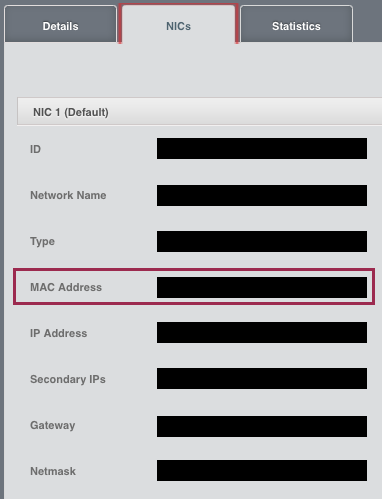
## How Has This Been Tested?
Tested locally to verify that the correct mac address gets displayed in the detail view.
* 4.11:
  Changed the implementation of isVolumeOnManagedStorage(VolumeInfo) to check if the data store in question is for primary storage (and added a unit test from Daan Hoogland)
  vmware: reboot VR after mac updates (#2794)
This re-introduces the rebooting of VR after setup of nics/macs in
case of VMware. It also adds a minor enhancement to show the console
esp. for root admins when VRs and systemvms are in starting state.

Signed-off-by: Rohit Yadav <rohit.yadav@shapeblue.com>
On the 'NICs' tab, when a user clicks the 'Add network to VM' button to add a network to a VM, the 'Add network to VM' popup screen does not have an IP Address input field to allow a user to define a specific IP Address for a NIC. A user can specify the IP address for the first NIC when creating a VM instance, but cannot do that for subsequent NICs when adding a network to a VM.

To Reproduce:
Go to the 'Instances' screen by clicking the 'Instances' tab on the lefthand side.
On the 'Instances' screen click on a specific VM instance name.
This will open the 'Details' tab for the specific VM instance.
Click on the 'NICs' tab and then click on the 'Add network to VM' button to add a network to a VM.
The 'Add network to VM' popup screen will display.

Actual Behaviour:
The 'Add network to VM' popup screen does not have an IP Address input field to allow a user to define a specific IP Address for a NIC.

Expected behaviour:
The 'Add network to VM' popup screen must have an IP Address input field to allow a user to define a specific IP Address for a NIC.
Since the addNicToVirtualMachine API's ipaddress field is not required, the IP Address input field is also not a required field.
The IP Address input field must be validated for a valid IPv4 formatted value if the user enters anything into the field.
The valid user-specified IPv4 IP Address value must be allocated to the NIC if it is within the acceptable IP range for the chosen Network.
In the UI, on the Instances screen, the Quickview popup window and the Details window do not display the 'Reset SSH Key Pair' button for VMs in a running state. They only display when the VM is in a stopped state. This is inconsistent with the 'Reset Password' button behaviour, where it displays in both VM states: running and stopped. This fixes the issue so that the 'Reset SSH Key Pair' button also displays in both VM states.

Expected Behaviour:
In the UI, on the Instances screen, the Quickview popup window and the Details window must display the 'Reset SSH Key Pair' button in both VM states: running and stopped. When a user clicks on the 'Reset SSH Key Pair' button and a VM is in a running state, it will display a message "Vm xxx should be stopped to do SSH Key reset".
Actual Behaviour:
In the UI, on the Instances screen, the Quickview popup window and the Details window do not display the 'Reset SSH Key Pair' button for VMs in a running state. It only displays when the VM is in a stopped state.
While executing the find/replace, I found some blocks of duplicated code. Therefore, I extracted the duplicated part to an utils file, and then removed the duplicated blocks.
- Fixes timezone issue where dates show up as nvalid in UI
- Introduces new event timeline listing/filtering of events
- Several UI improvements to add columns in list views
- Bulk operations support in instance list view to shutdown and destroy
  multiple-selected VMs (limitation: after operation, redundant entries
  may show up in the list view, refreshing VM list view fixes that)
- Align table thead/tbody to avoid splitting of tables

Signed-off-by: Rohit Yadav <rohit.yadav@shapeblue.com>
This feature allows CloudStack administrators to create layer 2 networks on CloudStack. As these networks are purely layer 2, they don't require IP addresses or Virtual Router, only VLAN is necessary (provided by administrator or assigned by CloudStack). Also, network services should be handled externally, e.g. DNS, DHCP, as they are not provided by L2 networks.
As a consequence, a new Guest Network type is created within CloudStack: L2

Description:
Network offerings and networks support new guest type: L2.
L2 Network offering creation allows administrator to select Specify VLAN or let CloudStack assign it dynamically.
L2 Network creation allows administrator to specify VLAN tag (if network offerings allows it) or simply create network.
VM deployments on L2 networks:
VMs should not IP addresses or any network service
No Virtual Router deployed on network
If Specify VLAN = true for network offering, network gets implemented using a dynamically assigned VLAN
UI changes

A new button is added on Networks tab, available for admins, to allow L2 networks creation
Supports following viewing and navigation/filtering:

- Networks -> view instances (instances that have nics on this network)
- Infra-> VRs -> view instances (attached to the VR's guest network id),
  view owner account (if not system, or project), view instances
- Infra -> VRs -> list of VPC redundant VRs will have redundant state in
  parenthesis in the list

Signed-off-by: Rohit Yadav <rohit.yadav@shapeblue.com>
Reviewed-By: Rashmi Dixit

    Problem: All the hosts suitable for VM Migration are not shown in the UI. This could
    confuse the user as the target host might never be shown in the UI.

    Root Cause: The API (findHostsForMigration) always returned page 1 results which would
    be always <= default.page.size global parameter. Therefore, in case of large
    no. of hosts where the result can map to multiple pages, this issue would arise.

    Solution: 1. Replace drop-down with listView widget.
    2. Allow lazy-loading of records on listView's scroll.
    3. Show additional parameters (CPU/Memory used) to assist admin in decision making.
    4. Provide 'Search by host name' to limit the results.

Added change where if there are no hosts found, an empty row with message will
appear.
[4.10] CLOUDSTACK-7985: assignVM in Advanced zone with Security GroupsThis commit contains the following changes:
(1) implementation of assignVM in Advanced zone with Security Groups
(2) keep the default nic on shared network when assignVM
(3) allow migrate vm from/to project;
(4) UI change for selecting account/project/network

* pr/844:
  CLOUDSTACK-7985: assignVM in Advanced zone with Security Groups
  CLOUDSTACK-7985: keep the default nic on shared network when assignVM
  CLOUDSTACK-7985: (1) allow migrate vm from/to project; (2) UI change for selecting account/project/network

Signed-off-by: Rajani Karuturi <rajani.karuturi@accelerite.com>
(1) add support to create/delete/revert vm snapshots on running vms with QCOW2 format
(2) add new API to create volume snapshot from vm snapshot
(3) delete metadata of vm snapshots before stopping/migrating and recover vm snapshots after starting/migrating
(4) enable deleting of VM snapshot on stopped vm or vm snapshot is not listed in qcow2 image.
(5) enable smoke tests for vmsnaphsots on KVM
[master] ui: Fix undefined check in instances.js, regression from 459d638(fix is already included in the https://github.com/apache/cloudstack/pull/1106 for 4.6 as well)

* pr/1119:
  ui: Fix undefined check in instances.js, regression from 459d638

Signed-off-by: Rohit Yadav <rohit.yadav@shapeblue.com>
 Rohit Yadav
 pavanaravapalli
 Wei Zhou
 Gabriel Beims Bräscher
 Daan Hoogland
 Spaceman1984
 Abhishek Kumar
 EK
EK
 Anurag Awasthi
 Nico Wohlfarth
 Rohit Yadav
 Philipp Bankonier
 Dingane Hlaluku
 Henko
Henko
 Philipp Bankonier
 Mike Tutkowski
 ernjvr
 Rafael Weingärtner
 dahn
dahn
 Nicolas Vazquez
 Rohit Yadav
 subhash yedugundla
 Rajani Karuturi
 rashmidixit
 Sanket Thite
 Rajani Karuturi
 Wei Zhou
 Daan Hoogland



